← Otto User GuideLock Screen
Locking hides your session behind an opaque surface on every monitor and routes all input to the locker. Everything underneath is untouched and comes back exactly as you left it: windows, workspaces, focus, running programs.
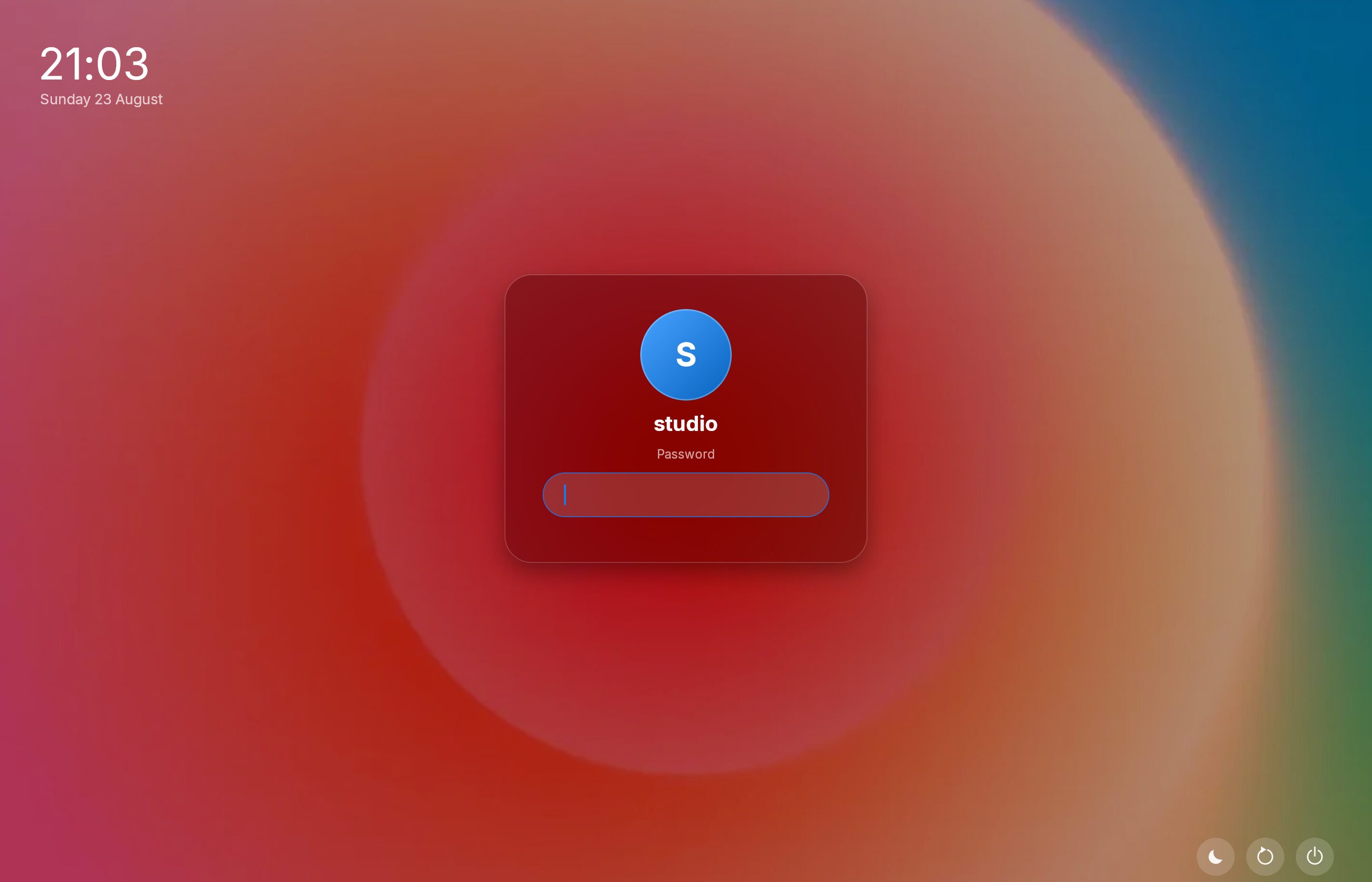
The clock and date sit top left, the panel is centred, and sleep, restart and power sit bottom right. The panel carries the account’s avatar (or its initials when there is no avatar file), the account name, and the password field.
Otto-lock
Otto uses ext-session-lock-v1, the Wayland protocol designed for this. Its
key guarantee: if the locker crashes, the screen stays blank rather than
revealing what was behind it.
Otto ships otto-lock as the default locker, and any ext-session-lock-v1
client can be configured in its place. Otto starts the locker itself, and only
the locker it started is allowed to lock the screen. Whatever holds the lock
screen is what you type your password into, so no other program, an app you
installed or a script, can put up a lock screen of its own.
Setup
1. Install the PAM service
otto-lock authenticates through PAM using a dedicated service. The service
file must exist, otherwise PAM falls through to other, which denies
everything.
Arch and Fedora packages install it for you. On Debian and Ubuntu, copy it yourself:
sudo cp /usr/share/doc/otto/otto-lock.pam.example /etc/pam.d/otto-lock
Then edit it: the shipped file is written for distributions with a system-auth
stack (Arch, Fedora, openSUSE). On Debian and Ubuntu, replace system-auth with
common-auth and common-account:
auth      sufficient pam_fprintd.so
auth      include    common-auth
account   include    common-account
otto-lock does notice a missing service file and falls back to system-auth,
then login. But the fallback is not the configuration anyone reviewed, so
install the file properly.
2. Bind the lock action
Ctrl+Alt+Escape locks the session. It is handled ahead of the config from the
raw hardware key code, so it works whatever your layout is and whatever holds
the keyboard.
A lock shortcut you bind yourself works even while an app is holding the keyboard shortcuts for itself, the way a virtual machine or a remote desktop viewer does. Otto’s other shortcuts go to that app; locking and VT switching never do.
You can bind it elsewhere too:
[keyboard_shortcuts]
"Logo+L" = "LockSession"
3. Optionally, choose a different locker
[lock]
locker_command = "otto-lock"
locker_args = []
Any ext-session-lock-v1 locker fits here: swaylock, hyprlock, gtklock.
Give the program alone, without spaces; its options go in locker_args.
Otto hands the locker its own connection (WAYLAND_SOCKET) rather than the
session’s display. Lockers built on libwayland or wayland-rs pick that up
without being told.
You can also change the locker, its options, the auto-lock timeout and locking
on suspend in Settings › Lock & Login. These decide what you type your
password into, so Otto asks for your password first, in its own panel, naming
the change (“Change the program that locks your screen to “swaylock”?”). The
same happens when a script changes them with busctl. The question goes
through polkit, so it needs polkit installed; without it, edit config.toml
instead, which works as before. The greeter and the lid and power-button
actions ask the same way.
Using it
The otto-lock panel is a frosted card with your avatar, a password field, and
a fingerprint mark when a fingerprint reader is configured. It shows a clock,
which keeps time however long you are away.
Type your password and press Enter, or touch the reader.
A refused attempt returns you to the field with the error shown and offers another try. The delay between attempts comes from PAM’s own rate limiting, not from the locker.
The lock screen picks up your Otto configuration, including your own user config, so it matches the session’s theme.
Fingerprint unlock
The shipped PAM file lists pam_fprintd explicitly:
auth sufficient pam_fprintd.so
It has to be listed explicitly because a distribution’s system-auth usually
does not include it. A reader configured for sudo or polkit is configured in
those services, not in the shared stack.
sufficient means a recognised finger is enough, and anything else falls
through to the password prompt below. The module holds the conversation open
until it times out, and anything you type meanwhile waits for the prompt that
follows, which is what the panel’s “Enter Password” button is for.
Enroll fingers with fprintd-enroll first. On a machine with no reader, delete
the line.
Automatic locking
[lock]
auto_lock_timeout = 300   # seconds; 0 (the default) never auto-locks
The countdown measures the absence of keyboard, pointer, touch and tablet input. Any input event resets it, regardless of what the compositor does with it afterwards.
Idle inhibitors
A client holding an idle-inhibit-unstable-v1 inhibitor (a video player during
playback, a presentation tool) holds auto-lock off, and restarts the
countdown when it releases the inhibitor. So the timer runs from when the video
stops, not from your last keypress.
Otto only honours an inhibitor while its surface is on screen: a window that is not minimized, on the workspace its monitor is showing, or a panel (a layer surface) that is mapped. A surface with no window at all, or a window on another workspace, does not count. The protocol leaves that judgment to the compositor precisely because clients forget to drop inhibitors, and one stale or invisible inhibitor would otherwise disable locking for the whole session.
The check runs on the timer’s tick, so an inhibitor released just after a tick can delay the lock by up to one further timeout.
What still works while locked
Ctrl+Alt+F1…F12 | VT switching; always available |
Ctrl+Alt+Escape | Lock (already locked, so a no-op) |
| Power button | Runs your on_power_button action |
| Everything else | Nothing. The locker owns the keyboard; all configured shortcuts are inactive. |
Multiple monitors are all covered, including ones plugged in, unplugged, or mode-changed while locked.
The screen goes blank the moment you lock, before the locker has even started, so nothing of your desktop stays visible while it comes up.
If the locker crashes, Otto restarts it, rate-limited, so a crash is recoverable without a VT switch, and the screen never uncovers in the meantime. The same goes for a locker that fails to start: the screen stays blank and Otto keeps trying.
Locking from a script
Ask logind, and Otto starts your configured locker:
loginctl lock-session
That is the same thing the shortcut, the lid and the auto-lock timer do. A
suspend hook or an external idle daemon (swayidle) should run
loginctl lock-session too.
Starting a locker yourself, otto-lock or swaylock from a terminal or a
script, no longer locks the screen: Otto only accepts the lock from the locker
it started, and refuses the request (the log says “session lock requested by a
client Otto did not start as its locker”). To use a different locker, set it
as locker_command.
Locking on suspend
Every suspend locks first, so the machine wakes to the lock screen: the power
menu, the power button, closing the lid and systemctl suspend alike. Otto
asks logind to wait for it (a “delay” inhibitor, listed by
systemd-inhibit --list as “Otto: lock before sleep”), so the machine goes to
sleep only once the screen is blank, or after four seconds at most.
This is on by default. To wake to your desktop instead, set:
[lock]
on_suspend = false
Locking and the lid
on_lid_close = "lock" locks when you close the lid, and locks before every
suspend even with on_suspend = false. Clamshell and remote sessions
deliberately stay unlocked — the session is still in use. See
Power Management.
Troubleshooting
The screen goes blank when I press Ctrl+Alt+Escape, but the password panel
never appears. The locker failed to launch. Otto keeps the screen blank and
keeps retrying every few seconds. Switch VT with Ctrl+Alt+F2, log in, and
check Otto’s log for why: “Failed to start the locker” is logged once per
lock, with the reason. Check that otto-lock is installed, or that your
locker_command names a program that exists. Running the locker by hand from a
terminal will not lock (see
Locking from a script), but it does show whether the
program starts at all.
My password is rejected even though it is correct. The PAM service file is
missing or wrong. Check /etc/pam.d/otto-lock exists and uses the right stack
for your distribution (system-auth vs common-auth). The log says which
fallback the locker resorted to.
The screen is blank but there is no password panel. The locker died, or is
failing to start. Otto keeps the screen blank and starts a new locker every few
seconds; the panel normally comes back on its own. If it does not, switch VT
with Ctrl+Alt+F2, log in, and check the logs.
The fingerprint reader is not offered. Confirm pam_fprintd.so is in
/etc/pam.d/otto-lock and that you have enrolled a finger
(fprintd-list $USER).
The session never auto-locks. auto_lock_timeout defaults to 0, which
means never. If it is set and still does not fire, a client is probably holding
an idle inhibitor; check for a paused-but-not-closed video.
See also
- Login Greeter: the same panel, for logging in
- Power Management: locking on lid close and power button