← Otto User GuideFiles
otto-files is Otto’s file manager. Browse the filesystem, open things, move
them around, and preview a file without opening it at all.
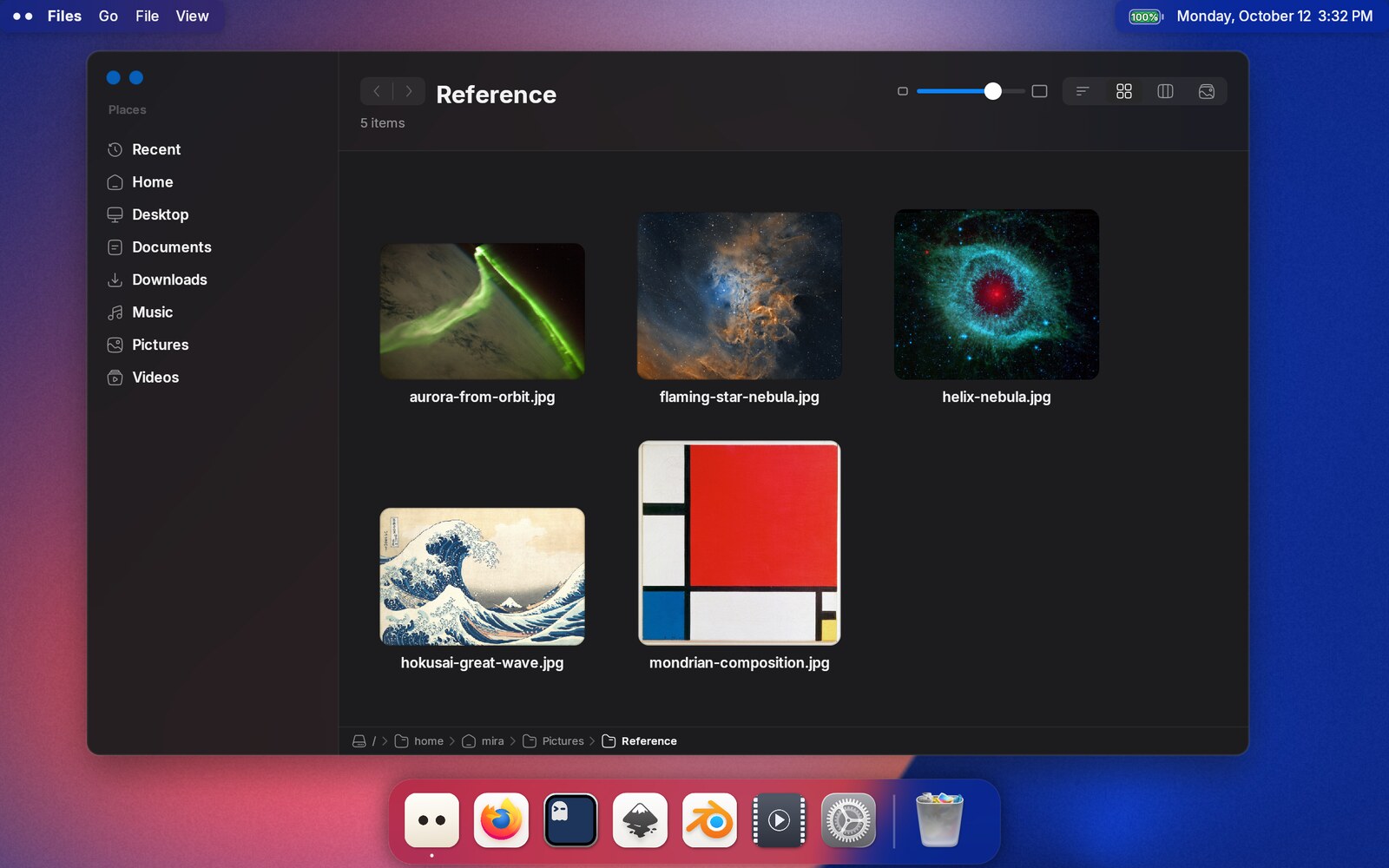
First version. Files is new and aims to be genuinely useful for everyday browsing, but it is not finished. What is missing is listed at the bottom of this page rather than left for you to discover.
Opening it
Launch Files from the Dock or the launcher, or run otto-files. It also
serves the file-chooser portal, so “Open” and “Save as” in a sandboxed
application land here. “Open Containing Folder” in a browser or editor does not
yet. That goes through org.freedesktop.FileManager1, which Files does not
implement.
Ctrl+N opens a new window at your home directory. To open a specific folder
in a new window, hold Ctrl and double-click it.
The four views
| View | Key | What it is for |
|---|---|---|
| List | Ctrl+1 | One row per entry, with size and date |
| Icon | Ctrl+2 | A grid of large icons and thumbnails |
| Column | Ctrl+3 | Miller columns: each folder opens a pane to the right, with a preview column at the end |
| Photos | Ctrl+4 | Pictures at their own shapes, in rows grouped by day |
Files remembers the view you pick for a folder and uses it again the next time you open that folder. Folders you have not picked a view for open in whatever view the window is in. In the column view, clicking or arrowing into folders never changes the view; only going somewhere new does, such as a sidebar place or Back.
Pictures, PDFs and videos show a thumbnail instead of a generic type icon.
Video thumbnails need ffmpegthumbnailer or ffmpeg installed, and HEIC and
AVIF photos — what a phone takes — need libvips or ImageMagick; without them
those files keep their type icon.
Files reads the shared thumbnail cache that other file managers write, so
folders another manager has already been through come up with pictures
immediately. Files does not write to that cache yet, so thumbnails it makes for
itself are not reused elsewhere.
In the icon view the slider in the header sets the size of the icons, from
small to very large; Ctrl+=, Ctrl+- and pinching do the same.
Photos
Photos is for a folder of pictures. The folders inside it come first, each shown as a card of the newest pictures in it. The pictures follow in rows that keep each one’s own shape, newest day first, under a heading for each day. Anything that is not a picture comes last, under Other Files.
- Size: the slider in the header makes the pictures bigger or smaller.
Ctrl+=andCtrl+-do the same, and so does pinching on the touchpad. - Grouping: the Group by Day button switches to one heading per month, or to no headings at all.
- Info: a panel on the right describes what is selected. With one
picture selected it shows the picture, its size and where it is, and its
main colours; click a colour to copy it, for example
#F2845C. For a folder it shows how many items it holds, with several things selected how many and how much they take up, and with nothing selected what the folder holds.
Files remembers the size and the grouping.
Getting around
| Key | Where it goes |
|---|---|
Backspace or Alt+↑ | Up one folder |
Alt+← / Alt+→ | Back and forward, through where you have been |
Alt+Home | Your home folder |
Ctrl+L | Type a path (see below) |
Ctrl+O, or double-click | Open the entry at the cursor |
← → ↑ ↓ | Move the cursor; Right descends into a folder |
Back and forward are also the two arrows in the header, and each half dims when there is nowhere for it to go.
The command palette
Ctrl+P opens a panel where you type a few letters to find and run any
command in the window, without needing its menu or shortcut. It also has
commands the menus don’t: selecting by pattern, renaming many files from one
pattern, and commands added by your own scripts. See
Command Palette and
Custom Commands in Files, which ends in a
PDF from Pictures tutorial.
Typing a path
Ctrl+L turns the title into a text field holding the folder you are in.
Type or paste a path and press Return to go there; Escape, or a second
Ctrl+L, puts the title back and leaves you where you were.
Tabcompletes against the folder being typed, to the one match or as far as every match agrees, and adds the/for you, so you can walk down a tree without reaching for it. Hidden files are only offered once you have typed the leading dot.~is your home folder, a path starting with/is taken as it reads, and anything else is relative to the folder on screen, so a bare folder name is enough.- A path to a file opens the folder holding it with the file selected, which is what pasting one out of a terminal usually means.
- A path that is not there leaves the field up, with the reason under it, so you can correct it rather than type the whole thing again.
Type-ahead and the sidebar
- Type a few letters to jump to the first entry whose name starts with them. This selects, it does not filter: the whole folder stays on screen. The typed text expires after about a second, and repeating one letter cycles through the entries beginning with it.
- The sidebar holds Recent, your home, and whichever of desktop, documents, downloads, music, pictures and videos you actually have. See Changing what is in the sidebar.
Changing what is in the sidebar
The sidebar works out of the box and needs no setting up. To change it, work on the sidebar itself:
- Add a folder by dragging it into the sidebar, between two rows or below the last one. A line shows where it will go. Nothing on disk moves. (Dropping onto the middle of a row still moves files into that folder.) You can also right-click selected folders and choose Add to Sidebar.
- Reorder the sidebar by dragging any row, standard or your own, up or down. The other rows move aside to make room where it will land.
- Remove a row by right-clicking it and choosing Remove from Sidebar. A standard row, such as Music, is hidden rather than removed.
- Bring a hidden standard row back by right-clicking an empty part of the sidebar and choosing Show with that row’s name.
Until you reorder anything, your own folders come after the standard ones. Every open window updates straight away.
All of this is saved in ~/.config/otto/files.toml, which you can also edit by
hand. Comments and anything else in the file are kept when Files changes it:
[sidebar]
# Standard rows to leave out. Any of: recent, home, desktop, documents,
# downloads, music, pictures, videos.
hide = ["music", "videos"]

# Your own folders, added under the standard ones.
[[sidebar.places]]
path = "~/dev/otto"
label = "Otto"          # optional — the folder's own name is used otherwise
icon = "folder-code"    # optional — a plain folder is used otherwise

[[sidebar.places]]
path = "/mnt/archive"
Paths may start with ~ or $HOME. A folder that is not there is left out
rather than shown as a row leading nowhere, so a moved disk costs you that one
row and nothing else. icon is an icon name from your theme; if the theme has
no such icon you get a plain folder.
Open windows pick up a saved change by themselves. If the file contains a mistake, Files says so in its log and carries on with the standard sidebar. You will not lose the sidebar over a stray bracket.
Finding files
Ctrl+F opens a search field under the header. Type what you are looking for
and press Return. Searching happens when you ask for it, not on every
keystroke, so you can finish the word first.
Two buttons beside the field say how wide to look:
- This folder: the folder you pressed
Ctrl+Fin, and everything inside it. This includes subfolders: it is a search of the folder, not a filter over the rows you can already see. - Everywhere: your whole home directory.
Switching between them re-runs the same query, so you can start narrow and widen without retyping.
A word finds names with its letters in order, so otfl finds
otto-files.rs, and several words must all match, in any order. Put a phrase
in quotes to match it exactly. Add filters to narrow things down:
| Type | To find |
|---|---|
text:ricevuta | files whose contents mention it (documents, and pictures Files has read) |
kind:pdf, kind:image,video | files of a kind: document, pdf, image, video, audio, text, archive, app, folder |
in:~/Documents | files under that folder, instead of the buttons’ choice |
modified:today, modified:<7d, modified:2025-03 | files changed today, in the last week, during March 2025 (>30d means longer ago) |
size:>100M, size:<1K | files bigger or smaller than that |
sort:size, sort:modified, sort:name | results biggest, newest or A to Z first |
A minus in front leaves things out: -kind:image, -in:~/Downloads,
-draft. The same query works anywhere Otto searches for files.
Results are an ordinary listing of real files. Space previews one, Return
opens it, and opening a folder takes you to it. The strip along the bottom
says where the selected file actually lives, and clicking any folder in that
trail goes there. Down moves into the results and hands the keyboard to
them, so Space previews rather than typing a space; Ctrl+F puts the caret
back in the query. Escape puts back the folder you started in, and Back and
Forward step out of a search and into it again.
From the command line
otto-search runs the same query in a terminal and prints the paths it
finds, best first:
otto-search 'invoice kind:pdf modified:<30d'
otto-search --in ~/Documents --limit 5 text:lease
otto-search --json 'kind:image modified:<7d'    # one JSON object per line
It looks in your home directory unless you pass --in or write in:. The one
difference from the search field: words Files has read in pictures are found
by Files only.
To see an answer in Files instead:
otto-files --search 'invoice kind:pdf'           # the results, searching everywhere
otto-files --search 'invoice' --in ~/Documents   # the results, in that folder
otto-files --select ~/Documents/invoice-0312.pdf # its folder, with it selected
Passing a file rather than a folder, as in otto-files ~/notes.txt, also
opens its folder with it selected. The agents use these to show you what they
found.
Search needs the file indexer
Search and the Recent listing both come from the desktop’s file index,
localsearch. It is not installed with Otto, because an indexer that reads
your whole home directory should be something you choose. If you want either
feature:
sudo pacman -S localsearch
It starts on demand and indexes in the background; localsearch status says
how far it has got. Nothing else needs configuring: Otto sets the session
variable the indexer’s service requires, so it starts on your next login after
installing it. (If you would rather not log out, systemctl --user set-environment XDG_SESSION_CLASS=user does the same thing for the session you
are in.)
Until it is running, Files says File indexing is off where a result count would go, rather than showing an empty listing: “nothing found” and “nothing was able to look” are different answers, and the second one should not send you hunting for a file that is sitting on your disk.
While the indexer is still working through your files, a search can miss the ones it has not reached yet, so Files says Still indexing (62%), results may be incomplete in the same place, or Indexing is paused when it has stopped partway. The line updates every few seconds and goes away once the indexer has caught up. Click either line to open the Search pane in Settings.
text: needs the indexer too: it searches the text localsearch has
extracted from documents.
Selecting
Click selects, Ctrl+click adds, Shift+click extends. In icon view, dragging
from empty space sweeps a rubber band over the grid and takes everything it
touches; hold Ctrl or Shift while you drag and it adds to what was already
selected. Clicking empty space selects nothing.
Working with files
| Key | Action |
|---|---|
Return or F2 | Rename, inline, with the extension left out of the selection |
Ctrl+C / Ctrl+X / Ctrl+V | Copy / cut / paste |
Delete, Ctrl+Delete, Ctrl+Backspace | Move to trash (in the Trash window, delete permanently; it asks first) |
Ctrl+Z | Undo the last operation |
Ctrl+I | Show info for the selection |
Space | Peek (see below) |
Escape | Cancel a rename, else clear the selection |
Copy, move and trash run in the background, with progress and a cancel that leaves nothing half-written: every copy is written under a temporary name and renamed into place only when it is complete. When a destination file already exists you get Replace, Skip or Keep Both, with “apply to all remaining”. Folders merge rather than being replaced.
Undo goes 32 operations deep for the current session and covers moves, copies, renames, new folders and trashing. Permanent deletion is not undoable, and the undo entry says so rather than quietly disappearing.
Drag and drop works within a window, between windows, and in and out of
other applications. Dragging a picture into a browser upload field or a chat
window does what you expect. A drop moves files by default; hold Ctrl to copy
them instead, or Ctrl+Shift to leave them where they are and make a link to
each. The cursor shows which one you will get before you let go.
Peek
Select something and press Space. A panel grows out of the row showing the
file itself: pictures, text and code, PDFs, a listing for a folder, and, for
audio and video, the tags, dimensions and duration read from the file’s header
rather than the whole file. An animated GIF plays, and keeps looping for as long
as the panel is open.
Arrow keys move to the next file and the preview follows, Space closes it,
and Escape closes it before it clears your selection.
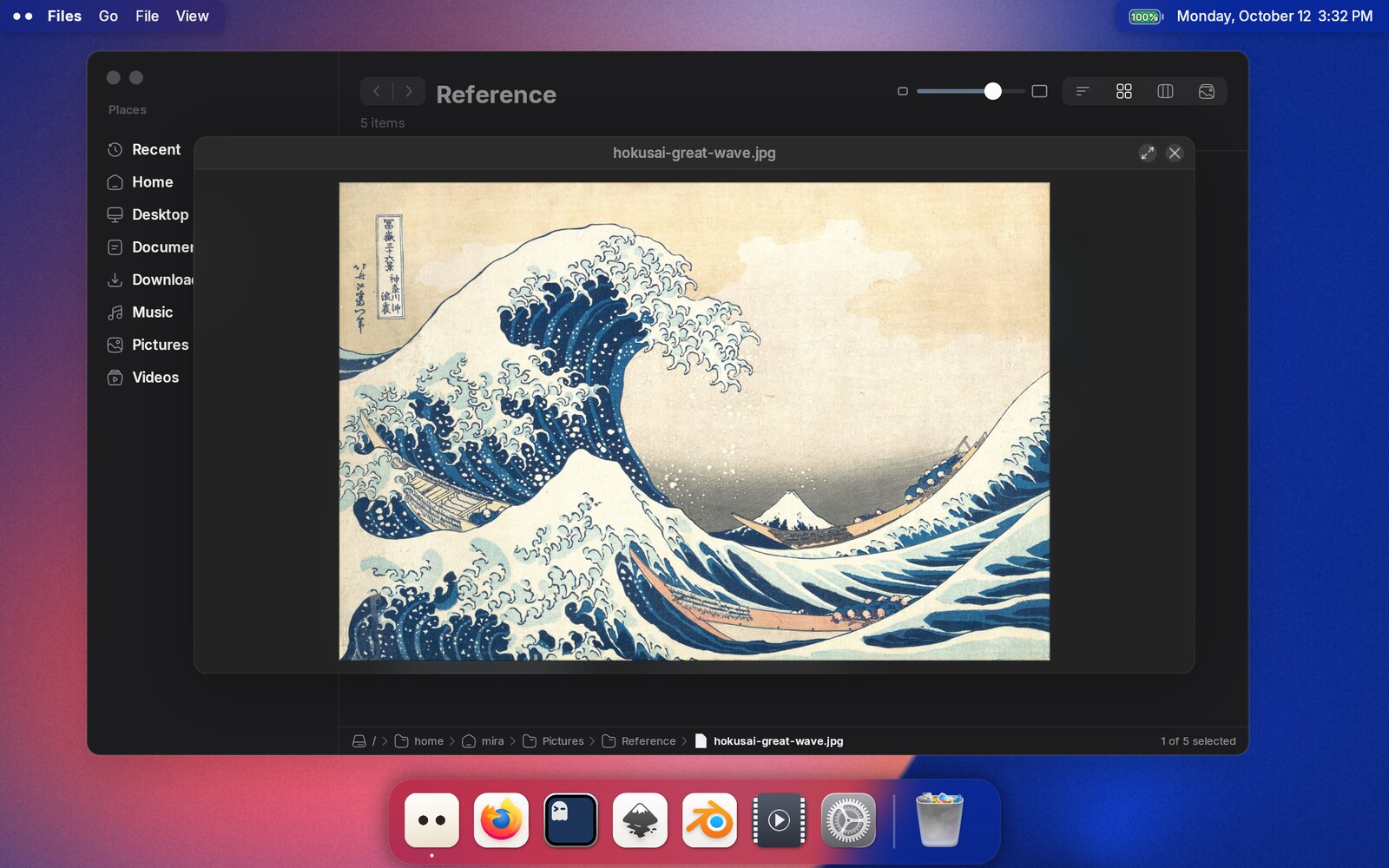
While the panel is up it owns the pointer: the wheel scrolls a text preview, a pinch zooms a picture, and a two-finger scroll pans a zoomed one with momentum and springy ends. Files never decodes a file itself. The bytes are parsed in a separate sandboxed process, and only a validated result is drawn.
Text in pictures
The words in a picture (a screenshot, a photo of a sign, a scanned page) can be
selected and copied, once tesseract is installed.
Install it from your distribution: tesseract plus a language pack such
as tesseract-data-eng (Arch), tesseract-ocr-eng (Debian, Ubuntu) or
tesseract-langpack-eng (Fedora). If you read in something other than
English, install your language’s pack as well. Swap the eng at the end for
its three-letter code: deu for German, fra for French, jpn for Japanese.
The languages used are your locale’s and English, whichever packs are
installed; there is nothing to configure. Without tesseract, pictures preview
as before and nothing says otherwise.
Selecting the words. The picture comes up first, with a small badge in the
panel’s bottom right corner: it pulses while the text is being read, settles
into a text mark once the words are there, and disappears if the picture turns
out to have no text in it. From the moment the text mark appears the pointer
turns into a text cursor over any word. Drag over words to select them; the
selection follows reading order, not the shape of the drag. Ctrl+C copies
the text with line breaks where the picture has them, Ctrl+A selects every
word, and Escape drops the selection before it closes the panel. Zooming in
keeps the selection on the same words.
Read once, then remembered. What was read is kept in ~/.cache/otto/ocr/,
never in the picture itself, so a picture is recognised once. Entries for
pictures you have not touched in 90 days are dropped; the only cost is reading
them again. Install a language pack later, or name a different recogniser, and
the pictures in the folder on screen are read again with it, a few at a time
in the background.
Find searches the words too. A word that appears in a screenshot lists that screenshot, even when file indexing is off. Pictures in the folder on screen are recognised in the background while the window is idle, so Find can answer for pictures you have never opened.
The preview column says where a picture has got to on its last caption line, and Get Info says the same thing: Text reads Reading… while the words are being found, then how many there are, or No text when there turned out to be none. Not read yet means nothing has looked at that one yet.
To read one again at once, when the words came out wrong or to avoid waiting for the background to get to it, select it and run Run text recognition from the command palette.
To read a whole folder now rather than waiting for the window to get to it:
otto-files --recognise ~/Pictures/Screenshots
It prints a line per picture and remembers what it found, the same as the window would.
To turn recognition off, in ~/.config/otto/files.toml:
[peek]
recognise_text = false
Words already remembered are still shown and searched.
The recogniser itself is a command you can name in the same section of that
file, to hand tesseract different options or to put another engine in its
place. Anything works that reads a PNG on standard input and writes
hOCR on standard output, which tesseract,
kraken, ocropus and most wrappers around the neural engines do. {languages}
is replaced with the language list, which is also in the OCR_LANGUAGES
variable:
[peek]
recogniser = "tesseract stdin stdout -l {languages} --psm 6 hocr"
That is the default command with --psm 6, which reads a picture as one
block of text — better on a screenshot of a paragraph, worse on a photo of a
sign.
Keeping the words. What Peek reads stays in the cache, not in the file. To end up with a document whose text travels with it, select the pictures and run Searchable PDF from Pictures: it puts the text behind each page, so the PDF can be searched and its words copied anywhere. The command comes from a sample script rather than from Files itself — PDF from Pictures builds it, and says how to install it.
Opening and saving in other applications
The same code is the desktop’s file picker, through the XDG Desktop Portal. When Firefox or Chrome asks you to pick a file to upload, or to save a page, you get this window rather than a GTK dialog. Save mode gives you a name field with the proposed name’s stem preselected, refuses a name that is not a single file name, and asks before replacing an existing file. The picker never creates the file; the application does that once you accept.
Trash
Move to trash follows the freedesktop trash specification: the file goes to
~/.local/share/Trash/, with a record of where it came from and when. Files on
another filesystem than your home directory are trashed by copying them into
the trash directory and removing the original, since a rename cannot cross
filesystems. The original is unlinked only once the copy is fully written.
The Trash window
Trash is an application of its own, in the dock and the applications list. It
is the same program as Files behind a different window, showing one flat
listing of everything you have thrown away, with an Original Location
column saying where each item came from. To launch it by hand, run
otto-files --trash, or otto-files trash:///, the URI the rest of the
desktop uses. Otto registers as the handler for trash:///, so
xdg-open trash:/// and anything else asking the desktop for the trash lands
here.
| Action | What it does |
|---|---|
| Put Back | Returns the selection to where it came from. If the folder it lived in has since been deleted, it is recreated; if something else has taken the name, the item stays in the Trash and says so |
| Empty Trash | Deletes everything, after asking |
Delete | Deletes the selection permanently, after asking. There is nowhere further to send it, so this is what the key means here |
| Dropping files on the window | Throws them away, the same as Move to Trash |
Ctrl+Z in the Files window undoes a delete the same way Put Back does. They
are the same operation reached from two places.
Items in the Trash cannot be opened, renamed, copied or pasted into. Put one back first and it is an ordinary file again. Trashed folders can be opened, so you can look inside before deciding.
The desk
The desk shows the files in your Desktop folder on the desktop itself, behind the windows. Turn it on in Settings ▸ Appearance ▸ Desk ▸ Show files on the desktop. The same group picks another folder with Choose….
It fills the screen by default. To make it smaller or move it, click Edit… beside Size and position. The desk comes to the front with an outline and handles: drag inside it to move it, drag an edge or a corner to resize it. Done (or Return, or Escape) keeps the result, Cancel puts it back. Reset makes it fill the screen again.
Icon size in the same group makes the desk’s icons bigger or smaller, from 32 to 160 px; the desk follows as you drag.
Arrangement decides where the icons go. Sorted grid (the default) keeps
them in order from the top-left corner. Free lets you put each one where
you like: drag an icon within the desk and it snaps to the nearest empty
spot on the grid, with a ring showing where it will land. Drag several at
once and they keep their places around the one you hold. New files take the
first empty spot, and a renamed file stays put. Right-click the desk for the
same choice under Arrange, and Clean Up to put every icon back in
order. Positions are saved in ~/.local/state/otto/desk.toml, never in the
Desktop folder, and each folder keeps its own: pointing the desk at another
folder and back brings the first layout back.
When there are more files than fit, When icons don’t fit in the same group decides what happens. Scroll (the default) lets the grid run on and scroll. Show in overlay keeps the grid still: the extra icons go into the overflow tile in the last cell, with a badge saying how many. Click the tile, or press Return or Space with it selected, to open the overflow panel: it grows out of the tile above your windows and shows the files two rows at a time, scrolling for the rest. There they work like any other icon on the desk: select them, open them, rename them, drag them out to the desk or another app. Escape, a click anywhere else, or switching to another window closes it. Dropping files on the tile puts them on the desk, like dropping them anywhere else on it.
All of this is kept in ~/.config/otto/files.toml, and the desk picks up
changes to that file as soon as they are saved:
[desk]
folder = "~/Desktop"      # default: your Desktop folder
arrange = "grid"          # grid | free
sort = "name"             # name | kind | modified
anchor = "fill"           # fill | top-left | top | top-right | left | center
                          # | right | bottom-left | bottom | bottom-right
size = ["40%", "60%"]     # ignored with fill; points or percentages
position = ["5%", "10%"]  # top-left corner, optional; ignored with fill
padding = 24              # points between the edge and the icons
icon_size = 64            # points
overflow = "scroll"       # scroll | stack
Not there yet
- Tabs, split views, and persisted column widths.
- Network and virtual filesystems:
smb://,sftp://, MTP. Local paths only. - Mounting, unmounting and ejecting devices. Mounted volumes do not appear in
the sidebar either. It lists Recent, your home directory, the XDG user
folders and whatever you have added yourself, and you reach anything else by
typing the path with
Ctrl+L. - Batch rename, archive browsing, tags and labels.
Shift+Delete(delete permanently) is deliberately inert for now.- Writing to the shared thumbnail cache.