← Otto Developer GuideThe Scene Graph
Almost everything Otto puts on screen (windows, their shadows and titlebars, the dock, exposé, the app switcher, the wallpaper, popups, the lock screen) lives in one retained tree of layers, managed by lay-rs.
This page is the map of that tree: what a layer is, how the tree is laid out, how a Wayland surface gets into it, how clients can style their own layers over a protocol, and how subtrees of it end up as separate buffers on separate KMS planes.
If you only read one thing: src/workspaces/ does not draw. It edits this
tree. Drawing happens later, once per frame, and only for the parts that
changed.
The whole chain at a glance
The tree’s top-level shape is not a drawing convenience — it is how Otto decomposes the screen for the display hardware. A handful of named subtrees under each output are rendered into buffers of their own, and each buffer is offered to the KMS plane it was cut out for:
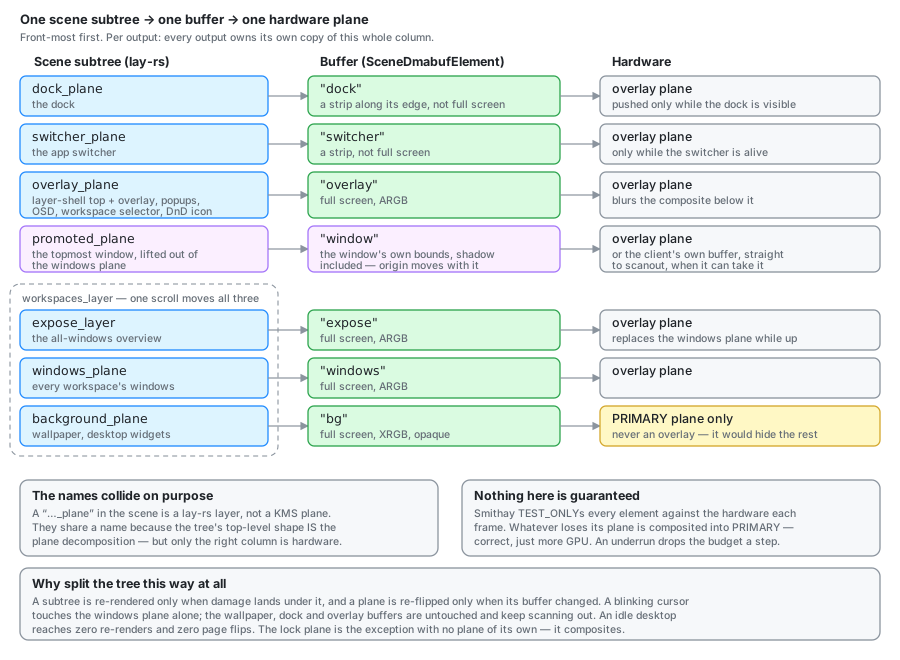
The rest of this page unpacks the left column; Layers is the unit those subtrees are built from, and DRM Planes is the right one.
What a layer is
A layer is a node with visual properties (position, size, opacity, transform, corner radius, border, shadow, blend mode, clipping), plus optional content: a closure that paints into a Skia canvas.
The right mental model is Core Animation’s CALayer, not a widget. A layer
does not know what it represents. It knows where it is, how it looks, and how
to paint itself. Otto sets a property, and the engine works out what changed,
what needs repainting, and how to animate between the old and new value.
Three consequences shape the whole codebase:
Animation is a property of the change, not of a loop. set_position(p, Some(transition)) is a spring or bezier animation. Nothing in Otto ticks a
frame counter to move a window; it states the destination and the feel.
Damage comes from the tree, not from the caller. The engine knows which
nodes changed and what they cover. That is what SceneElement reports to
Smithay’s damage tracker, and why an idle desktop renders nothing.
Layout is Taffy. Layers can use flexbox, or opt out with
position: Absolute, which most of Otto does, since it positions things
itself.
The layer itself (its full property set, how a change becomes an animated transaction, how content closures and picture caching work) is Layers. The rest of this page is the tree.
The engine and the root
One Engine is created in Otto::init (src/state/mod.rs) and shared as
Arc<Engine> by everything that touches the scene. Its root is the scene root,
and each output gets its own container beneath it.
let layers_engine = Engine::create(500.0, 500.0);
#[cfg(feature = "debugger")]
layers_engine.start_debugger();
With --features debugger, the engine serves the live tree at
http://localhost:8000/client/index.html (LAYERS_DEBUGGER_PORT overrides the
port). That is the fastest way to answer “where actually is this layer”.
The tree
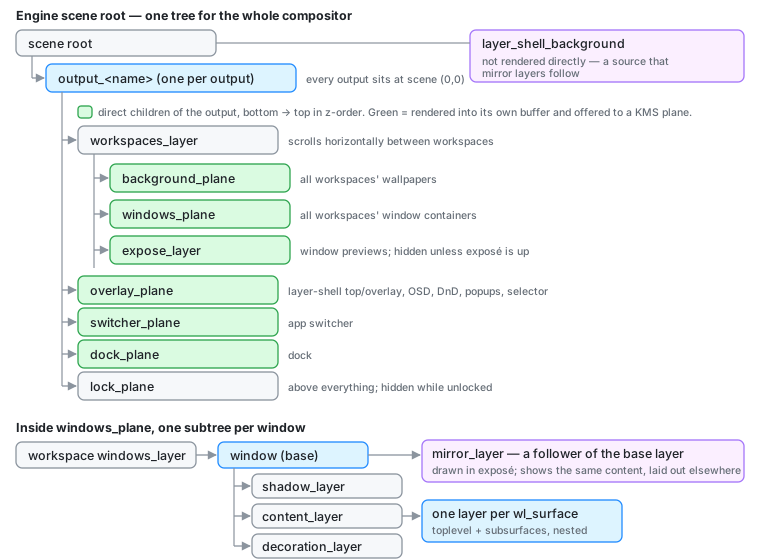
Per output
OutputWorkspaces (src/workspaces/mod.rs) owns one output’s branch. The
container is output_<name>, and every output’s container sits at scene
(0, 0).
That is deliberate and it surprises people. Outputs do not get laid out
side by side in the scene. Each output renders only its own subtree, so scene
coordinates are output-local by construction, and an output’s position in the
global layout is a property of Smithay’s Space (used for input and window
placement), not of the scene. The consequence is that pointer coordinates must
be rebased to the focused output’s origin before being fed to
layers_engine.pointer_move. Otherwise hit-testing lands on whichever
output’s subtree happens to be topmost. See
specs/multi-output.md.
The output’s direct children, bottom to top:
| Layer | Holds |
|---|---|
workspaces_layer | background_plane, windows_plane, promoted_plane, expose_layer. Scrolls horizontally on workspace switch, so all four move in sync for free |
overlay_plane | layer-shell top and overlay, workspace selector, dock_plane, OSD, drag-and-drop icon, popups |
switcher_plane | the app switcher |
lock_plane | the lock screen; hidden whenever the session is unlocked |
The dock has a container of its own, dock_plane, but it sits inside
overlay_plane rather than beside it: a KMS plane costs the full pixel rate
whatever its size, and the chrome fits in one. promoted_plane holds the
window promoted to a plane of its own, above windows_plane because a
promoted window is always the topmost one.
background_plane and windows_plane each hold every workspace’s content,
not just the current one. Workspace switching is one horizontal translation of
workspaces_layer rather than a show/hide of per-workspace containers, which
is why the transition is a continuous scroll and why a gesture can be
interrupted mid-flight.
Per window
WindowView (src/workspaces/window_view/view.rs) builds five layers per
window, the base plus four hanging off it in paint order:
- base (
window): the positioned node; everything else hangs off it shadow_layer: drop shadow, painted by aView,image_cachedcontent_layer: parent of the client’s own surface layersdecoration_layer: the server-side titlebar, hidden until the window negotiates SSD, drawn withBlendMode::BackgroundBlurborder_layer: the tile outline, hidden unless the window is tiled; topmost, because it draws over the client’s own edge pixels
Plus a mirror_layer, registered with add_follower_node on the base
layer. A follower shows the same content at a different place in the tree.
That is how exposé shows live previews without moving the real windows. The
catch is documented in exposé: lay-rs propagates NEEDS_PAINT
from a leader node itself, never from its descendants, so a client commit deep
in the surface tree does not mark the mirror.
How a Wayland surface becomes a layer
On commit, Otto walks the window’s surface tree and, for each surface, gets or
creates a layer (Otto::surface_layers, keyed by ObjectId), then calls
configure_surface_layer (src/workspaces/utils/mod.rs). Subsurfaces are
appended to their parent’s layer, so the layer hierarchy mirrors the surface
hierarchy.
The client’s buffer is not assigned to the layer as an image. Instead the layer gets a draw closure that looks the texture up at paint time:
layer.set_draw_content(move |canvas, w, h| {
    let tex = crate::textures_storage::get(&draw_wvs.id)?;
    // …place it per contents-gravity, convert buffer damage to layer coords…
    canvas.draw_image_rect_with_sampling_options(…);
    damage   // the closure returns its damage rect
});
Two things fall out of that indirection:
- The renderer imports the buffer into
textures_storageon its own schedule; the scene only holds an id. Re-installing the closure on every commit does not invalidate the layer’s cached picture. - The closure returns its damage rect, converted from buffer pixels into
layer-local coordinates using the same scale and offset the texture is drawn
with. It is not the only source:
Layer::add_damage/set_damagewritepending_damageon the node, which the next paint unions with the returned rect on equal footing. Unlike the return value, those also mark followers as needing paint.
Buffer pixels are not always physical pixels (a client painting at buffer
scale 2 on a 1.5× output hands over a 60 px buffer for 45 physical px; otto-kit
clients draw at the preferred scale and match them 1:1), so the closure
also bridges that ratio, and honours the viewport crop (phy_src) rather than
the raw texture size. Chrome, among others, reuses oversized GPU allocations.
Views: state in, layer tree out
For anything more structured than a single node, Otto uses lay-rs Views: a
model plus a render function returning a LayerTree, mounted onto a layer.
let view = View::new("window_shadow", model, Box::new(view_window_shadow));
view.mount_layer(shadow_layer.clone());
view.update_state(&new_model);          // hashed; no-op when unchanged
update_state hashes the model and returns without touching the tree when the
hash matches, so pushing an unchanged model costs nothing. That matters:
update_decoration runs on every commit of a decorated window, and
re-rendering unconditionally would repaint the titlebar at the client’s frame
rate.
The workspace selector, window selector, background and context menus are all
views. The dock is not: DockView drives its layers directly.
Caching and opacity hints
Three per-layer flags do most of the performance work:
| Flag | Effect |
|---|---|
picture_cached | Records the draw closure into a Skia picture (a display list, not a bitmap) and replays it. Opacity and transform animations then cost a replay, not a re-rasterisation. On by default for every node; the calls that matter are the ones turning it off, for layers that mirror another subtree. |
image_cached | Rasterises to a bitmap. Right for expensive, static content: the window shadow uses it. |
content_opaque | Tells the engine the layer fully covers its bounds, so what is underneath can be skipped. |
Getting these wrong is usually why something is slow or stale, and
picture_cached / image_cached are both visible in the scene debugger.
From tree to pixels
The scene reaches Smithay through SceneElement
(crates/otto-render/src/render_elements/scene_element.rs), a render element that draws a node
and its descendants. It has three modes:
- Whole scene: the default, and the fallback for an output with no per-output container.
for_output_layer(layer): render from one output’s container, so scene coordinates are that output’s local coordinates.for_plane_subtree(layer, origin): render one subtree in isolation.
The third is the interesting one. It gets a fresh element Id so several can
coexist in one render_output call, it ignores ancestor visibility, and it
re-applies the dynamic part of the root’s scene position (the workspace scroll)
minus the output’s static origin.
Ignoring ancestor visibility is not a quirk — it is required. While exposé is
open, workspaces_layer is hidden; but the exposé subtree lives under that
hidden node. Honouring the ancestor would render exposé black. Any code path
that composites the scene by stacking subtrees (the virtual-output path in
src/udev/render.rs does exactly this) must stack them the same way the KMS
path does, or it diverges from what is on screen.
And onto KMS planes
SceneDmabufElement (crates/otto-render/src/render_elements/scene_dmabuf_element.rs) is the
same idea with a buffer attached: it renders a subtree, identified by a
NodeRef, into a GBM swapchain (2–3 slots, to avoid KMS scanning out a buffer
the GPU is still writing). Each slot is exported as a Dmabuf and handed to
Smithay as UnderlyingStorage::Dmabuf, which is what makes the element
eligible for direct plane assignment.
ensure_plane_elements allocates one per purpose, and wire_plane_nodes
points each at its scene node every frame (src/udev/planes.rs):
el.set_node_ref(ows.background_plane.id);
el.set_scene_origin(origin);
So the mapping is direct: one scene subtree → one buffer → one hardware
plane. The layer tree is not just a drawing structure; its top-level shape
is the plane decomposition. ensure_plane_elements allocates one element
each for the background, windows, exposé, overlay, promoted window and app
switcher. Most are full-screen; the switcher’s is a centred strip, because its
subtree only ever paints there.
A subtree is re-rendered only when damage lands under it, which is how an idle
desktop reaches zero re-renders and zero page flips. Details in
DRM Planes and
specs/plane-scanout.md.
Exposing layers to clients
otto-surface-style-unstable-v1 (src/surface_style/,
XML) hands a slice of
this machinery to Wayland clients. get_surface_style(wl_surface) creates a
lay-rs layer bound to that surface, and the client can then set position,
scale, rotation, anchor point, opacity, corner radius, border, shadow, blend
mode, clipping and contents gravity on it.
Property changes made inside a transaction accumulate and animate together; outside one they apply immediately:
if let Some(txn_id) = active_transaction {
    let change = sstyle.layer.change_position(Point { x, y });
    accumulate_change(state, txn_id, change);   // animates on commit
} else {
    sstyle.layer.set_position((x, y), None);    // immediate
}
change_* produces a change the engine can animate; set_* applies now, with
the caveat that “now” means when no transition is attached. Given one,
set_* leaves the model value alone and lets an animation interpolate it, and
a change_* on its own animates nothing until it is scheduled through
add_animated_changes. That distinction is the whole protocol in miniature,
and it is the same one Otto’s own UI code uses: clients and the compositor
drive the same engine.
Two flags on the compositor side are worth knowing when debugging this:
client_owns_size (set when the client calls set_size, after which the
compositor stops overriding the layer’s bounds from the buffer) and
shared_gravity, an atomic the draw closure reads live so a gravity change
takes effect without rebuilding the closure.
Design background and what was deliberately left out: Surface Style Protocol.
Where to look
| Concern | File |
|---|---|
| Engine creation, surface → layer mapping | src/state/mod.rs |
| Per-output tree construction | src/workspaces/mod.rs (map_output) |
| Per-window layers | src/workspaces/window_view/view.rs |
| Surface layer configuration and the draw closure | src/workspaces/utils/mod.rs |
| Scene → Smithay render element | crates/otto-render/src/render_elements/scene_element.rs |
| Scene subtree → dmabuf → KMS plane | crates/otto-render/src/render_elements/scene_dmabuf_element.rs, src/udev/planes.rs |
| Client-facing protocol | src/surface_style/ |
Debugging
Build with --features debugger and open
http://localhost:8000/client/index.html for the live tree: node keys,
positions, sizes, and the cache flags. Every container Otto creates
sets a key (output_<name>, workspaces_<name>, background_plane_<name>,
window, …) so the tree is readable rather than a wall of ids.
Four runtime levers on the plane path, polled about once a second. They exist
only in debug-hooks builds (--features dev includes it):
touch /tmp/otto-tintwashes the GPU-composite fallback red, so anything that did not get a hardware plane is immediately visible.touch /tmp/otto-no-scanoutdisables window promotion, for A/B comparison.touch /tmp/otto-dump-planesdumps every plane buffer to PNG once.touch /tmp/otto-dump-scanoutdumps each output’s swapchain buffer, the frame as scanned out, to~/Pictures/Screenshots/otto_scanout_<output>.pngonce. It is the only way to see subpixel text as the output gets it: screencopy re-renders without the output’s pixel geometry.
Related: Rendering · Render Loop · DRM Planes · Exposé