← Otto Developer GuideRendering pipeline
This document explains how Otto gets from “some state changed” to “pixels on a display”, and where you would hook into that.
Files to follow along with:
src/render.rsbuilds the element list for each outputcrates/otto-render/src/skia_renderer.rsis the Skia wrapper over Smithay’s GL renderercrates/otto-render/src/render_elements/scene_element.rsdraws the scene graphsrc/udev/render.rsis the DRM frame path (the real one)src/winit.rsis the windowed dev path
The renderer and the render elements are the otto-render crate
(crates/otto-render/). The compositor re-exports its modules under their old
paths, so code in src/ still says crate::skia_renderer::SkiaRenderer.
The mental model
Otto is a retained-mode compositor wearing an immediate-mode compositor’s clothes.
Smithay expects a list of render elements per frame: “draw this texture at
this rect, it damaged these regions”. That is an immediate-mode API. Otto
satisfies it, but almost all of Otto’s UI (windows, the dock, exposé, the app
switcher, shadows, blur, every animation) lives in a single retained tree
managed by lay-rs, and is handed to Smithay as one element, the
SceneElement.
The analogy: think of the scene graph as a document, and the frame as printing
it. src/workspaces/ spends its time editing the document: moving a layer,
changing an opacity, starting an animation. It never prints. Once a frame, the
printer asks the document what changed, and re-inks only those parts of the
page.
That is why so little of Otto looks like drawing code, and why “why is this not updating?” is nearly always a damage question rather than a drawing question.
The layers underneath
Smithay owns the plumbing: a
GlesRenderer, the output abstraction, swapchains, and the damage tracker. Conceptually it renders into a buffer that someone will later present.The backend decides what a buffer is.
- winit: the output is a window inside another compositor; the buffer is presented into that host window.
- udev/DRM: the output is a real connector/CRTC/plane pipeline; buffers are submitted to KMS.
Otto wraps Smithay’s GL with Skia.
SkiaRenderertakes the current EGL framebuffer, wraps it as a Skia surface, and draws into that canvas. So everything Otto paints is Skia, but the buffer management is Smithay’s.Otto draws through the scene graph.
lay-rsowns the tree and its Taffy-based layout;SceneElementis the bridge into Smithay’s element list. The tree’s shape, and how subtrees of it become hardware planes, is The Scene Graph.
Frame flow
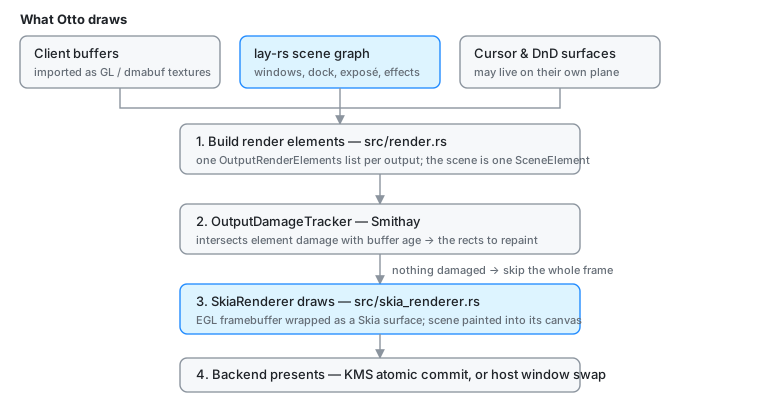
- Build elements (
src/render.rs) produces oneOutputRenderElementslist per output: theSceneElement, plus cursor and drag-and-drop surfaces, plus any debug overlays. - Hand them to
OutputDamageTracker. Smithay intersects each element’s damage with the age of the buffer about to be drawn into, and produces the set of rects that actually need repainting. If that set is empty, the frame is skipped entirely. - Render the damaged regions. Smithay drives the pass;
SkiaRendererwraps the framebuffer and theSceneElementpaints the scene into it. - Present. The backend submits the buffer (a KMS atomic commit, or a host window swap).
On udev this is not the whole story: Otto also splits the scene into several scanout-capable buffers so the display hardware can composite them without the GPU. See DRM Planes.
Backends in practice
winit is best for day-to-day development. The output is a regular window. There is no hardware cursor plane, so the cursor is composited normally. It does not offer real outputs, dmabuf import, hardware planes, or the screenshare frame path, so anything touching those has to be tested on udev. Touch gestures are unsupported.
udev/DRM is the production path. Smithay manages connectors, CRTCs, planes, swapchains and submission. The cursor can be promoted to its own DRM plane; parts of the scene can be promoted to overlay planes.
x11 runs Otto as an X11 client. Basic and not actively maintained.
Sampling a client’s texture
A client’s buffer is drawn through a Skia shader in
workspaces::utils::configure_surface_layer, and which filter that shader uses
is chosen per surface by surface_filter. Bicubic (Catmull-Rom) is the
general-purpose answer but costs ~12-16x nearest in the fragment shader, so a
buffer that needs no resampling is copied instead.
Whether it needs resampling is a question about physical pixels, not about the layer. The scale and translation the gate looks at describe the texture’s mapping onto its layer; that only says what reaches the framebuffer if the layer itself starts on a whole physical pixel. Surface origins are logical values multiplied by the output scale, so on a fractional scale they land mid-pixel (logical 101 x 1.65 = 166.65) unless something rounds them.
Two rules keep that honest, and they only work together:
configure_surface_layerrounds every surface origin it sets to a whole physical pixel. Half a pixel of placement accuracy is worth less than the identity mapping it buys back, which is both the crisp result and the cheap one.surface_filtertakespixel_grid_alignedand refuses both cheap branches without it.client_owns_sizesurfaces, whose position comes from the client, never get it: drawn 1:1 they take bilinear, which is exact wherever the client stays on whole pixels, and anything else takes bicubic.
Dropping either one puts a 1:1 buffer through a point sample half a pixel off, which shows up as doubled and dropped rows of pixels across every window on a fractionally scaled output.
Clients that are not fractional-scale aware hand over an integer-scaled buffer
(a 2x buffer on a 1.65x output, scale = 0.825) and take the bicubic path.
That is a real resample and there is nothing to snap away.
otto-kit clients are fractional-scale aware. Every kit surface is drawn at
the preferred_scale the compositor sends for it: a buffer
round(logical × scale) pixels at buffer_scale = 1, shown at its logical
size through a wp_viewport, or a plain buffer_scale = n at a whole scale.
Either way the buffer reaches the output 1:1, which is what makes hinted and
subpixel text worth drawing. A new preferred scale resizes the buffer on the
surface’s next draw (BaseWaylandSurface::sync_scale) and repaints its whole
layer tree; the app hears about it through App::on_scale_changed. The
buffer scale and viewport describing a buffer of a new size go out only
with that buffer (ScaledBuffer::flush, from the draw, just before the
swap attaches it): the compositor checks them against the buffer a commit
carries, and a crop or a move committed without a repaint in between
would otherwise land state for a buffer that is not there yet, which kills
the client.
Because the buffer is shown 1:1, a kit window renders subpixel (LCD) text for
the panel under it: the Skia surface is wrapped with the PixelGeometry of the
one output the surface is on, from wl_output.subpixel turned by the output’s
transform (a 90° output makes horizontal stripes vertical; 180° reverses
them). A surface on two outputs, on one that reports no layout, cropped or
stretched by a viewport, or drawn at a whole scale a compositor without
wp_viewporter shrinks gets Unknown, which is greyscale text. It is checked
on every draw and the surface re-wrapped when it changes.
Sizes, not just origins
An origin on the grid is only half of a box. A size reaches a layer the same
way a position does, as a logical integer multiplied by the output scale, so
snapping the origin alone leaves the far edge fractional. The server-side
titlebar is 34 logical points (WindowElement::DECORATION_HEIGHT), and
34 x 1.75 = 59.5: its bottom hairline paints across three physical rows with
no fully covered one, and the client content that starts below it begins on a
half pixel, which resamples the entire surface subtree under it.
workspaces::utils::snap_extent_px snaps the far edge rather than the
extent on its own:
(origin + extent).round() - origin.round()
Rounding an origin and an extent independently is not equivalent and is wrong when the two round in opposite directions — origin 10.5 -> 11 with extent 9.5 -> 10 puts the edge at 21 instead of 20.
It is applied wherever a physical box is handed to a layer:
- the window box in
WindowViewBaseModel(bothupdate_window_viewpaths instate/mod.rs), which the shadow and the decoration are drawn from; - the decoration layer in
view_window_decoration; - the content layer’s y offset below the titlebar, rounded from the same value as the bar’s height so the client still starts exactly where the bar ends;
- the surface layer’s own size in
configure_surface_layer, snapped against the unrounded origin so it does not inherit the origin’s rounding error.
As with positions, an integer scale never leaves the grid and every one of these is a no-op there.
The wallpaper
The wallpaper follows the same rule as a client’s buffer, more strictly: it is
never resampled per frame. otto_kit::wallpaper renders it once per output
into a frame exactly the output’s size, and BackgroundView draws that frame
1:1. The contract is specs/wallpaper.md.
- Why 1:1. A wallpaper scaled in the shader puts pixel centres between texels. Where one lands exactly on a texel boundary — a 16:9 photo centred on a 21:9 screen sits at y = -247.5, which is every row — nearest sampling picks a side by the last bit of the interpolated coordinate. A repaint cropped to a damage rect rasterises different triangles from the whole paint and rounds the other way: the shimmer along a diagonal from a dragged window in nongio/otto#361.
- The frame.
render_framelays the image out (arrange: the mode,object-position, zoom, the span’s place on the desktop), snaps the visible edges to whole pixels, and resamples exactly the image region inside them withotto_kit::utils::resample: a separable kernel that widens with the ratio (Lanczos-3 shrinking, Mitchell growing), on linear premultiplied light. An axis drawn 1:1 is moved onto a whole pixel and copied, not resampled at a half-pixel phase: Mitchell does not interpolate, so that would blur every pixel into its neighbour. A tile is resampled only as far as the screen shows it. SVGs are drawn as vectors. The frame is opaque, the fill colour behind the image. - The draw.
otto_kit::wallpaper::paintsamples bilinear with mipmaps and clamps. At the 1:1 whole-pixel placement bilinear reads exactly one texel per pixel; the mipmaps are for the same recorded picture replayed small, as the exposé backdrop and the workspace previews.Placementkeeps every offset whole, so a frame drawn on a layer of another size (between a mode change and its new frame) still never sits on a half pixel. - The store.
workspaces::background::storekeys frames by file version, output size and style; one frame serves every workspace of that key. On the compositor’s thread a file is only stat’ed and its first bytes checked (wallpaper::probe), so a bad path is reported straight away; reading, decoding and resampling happen on a worker thread below the compositor’s priority, and the frame comes back through a calloop channel, which asks for a redraw. Only a failure of the global image refuses a setting; an output’s or a workspace’s own failing image is logged and shows the gradient. - Other clients. The lock screen and the greeter draw the wallpaper
themselves, through
paint_layout: the same layout, sampled at draw time.
The tests that hold this: otto_kit::wallpaper’s tests check that a frame is
the screen’s size in every mode, that 1:1 placements (an odd size difference
in centre, the #361 sizes in fill) copy pixels exactly, that cover never
leaves a half-pixel offset, and that a cropped paint equals a whole one;
utils::resample’s check aliasing, linear light and sharpness against Skia’s
single-pass cubic; tests/wallpaper.rs checks the screen against the frame
pixel for pixel and a cropped repaint against a whole one. The Vulkan tests in
crates/otto-render (vulkan_wallpaper_*, ignored) do the cropped-repaint
check on a GPU, and report what the old half-pixel nearest path did there.
Getting frames out
Two independent capture paths exist, and they share one GPU blit:
- PipeWire screenshare, used by the portal: after a successful render on udev, Otto blits the framebuffer into a PipeWire-provided DMA-BUF and queues it. Window streams take a different route and re-render the window’s own surface tree.
zwlr_screencopy_v1, used bygrim,wf-recorderandwl-mirror: dmabuf clients ride the same blit; SHM clients pay a CPU readback.
Both are described in Screen Sharing.