← Otto Developer GuideRender Loop
Otto’s render loop is built around one goal: keep input-to-pixels latency low without burning power when nothing is changing. Those two pull in opposite directions, and most of the machinery below is the compromise.
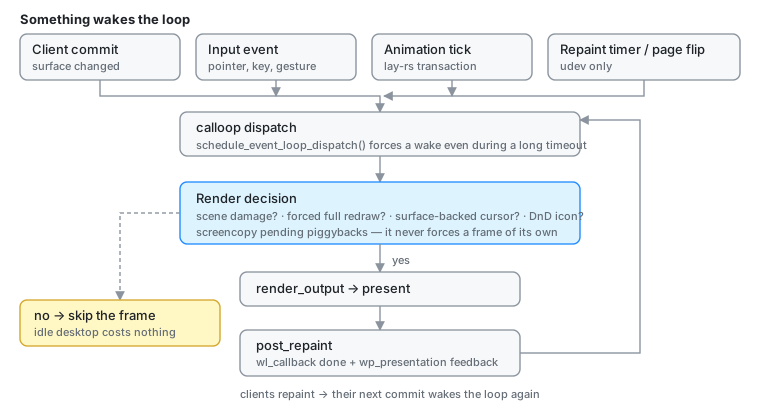
Why “quiet until needed”
If nothing damaged the scene, no cursor or drag surface moved, and no redraw was forced, then rendering again would produce identical pixels. Skipping that frame costs nothing and saves a GPU pass. An idle Otto desktop does no work.
Why timing matters
Most clients only repaint after they receive a frame callback (wl_callback)
or presentation feedback. So the compositor’s schedule dictates theirs.
The naive schedule, repainting immediately after VBlank and then sending frame callbacks, is the worst one. The client wakes up just after the compositor has already composed, so its new buffer misses the frame currently being prepared and lands one VBlank later than it could: roughly two frames of latency for no reason.
The fix is to render late: wait most of the frame period, let clients paint first, and compose as close to the next VBlank as the GPU allows.
Shared building blocks
Calloop dispatch. Otto owns a calloop::LoopHandle. When surface state
changes (a commit in src/shell/mod.rs, say), Otto::schedule_event_loop_dispatch()
sends a message on a calloop channel, waking the loop even if it is currently
blocked on a long timeout.
Frame bookkeeping. After a successful render, post_repaint /
take_presentation_feedback emit wl_callback done events and
wp_presentation feedback, with timestamps from the shared Clock<Monotonic>
so they line up with input event timestamps.
Damage tracking. Each backend feeds render_output a damage tracker, and
the heavy path is short-circuited when there is no new scene damage, no
requested redraw, and no auxiliary surface needing a repaint.
Cursor and drag-and-drop surfaces bypass the no-damage fast path, so interactive feedback stays responsive over a static scene.
Damage tracking: why it is the hard part
Damage tracking is what lets Otto stay responsive without redrawing whole outputs. It is also the single easiest thing to get subtly wrong:
- Damage is expressed in output space, but surfaces move, scale and transform.
- Cursor surfaces, drag icons and popups change without the scene changing, and must still trigger a redraw.
- Buffer age and partial updates mean reusing old pixels is only safe under specific conditions; getting it wrong shows up as stale rectangles.
- The scene sync can invent damage. Mirroring a Wayland surface into its
lay-rslayer is write-only:set_position,set_sizeandset_draw_contentscheduleNEEDS_LAYOUT/NEEDS_PAINTwithout comparing the value first. The sync runs per WINDOW: a commit on any surface of a window walks that window’s whole surface tree, and every popup hanging off it. Writing identical values back therefore dirties a client’s own tooltip at the client’s frame rate, and popup damage drives a full-screen backdrop rebuild on every commit. Two guards keep it honest:configure_surface_layerreduces each surface’s configuration to a hash (including the surface’sCommitCounter) and skips the whole body when it matches (crate::surface_config_cache), andPopupOverlayView::needs_syncskips a popup entirely unless the commit is its own or it moved. Any new writer into the scene must be idempotent the same way — an unguarded setter is indistinguishable from real damage downstream.
Translucent UI makes it worse. The dock and the app switcher do not cover
what is behind them, they blend with it. So a change in the background can
require re-rendering the overlay region (the blended result changed), and an
animation in the overlay can require re-rendering the background beneath it.
Otto handles this with backdrop regions from the lay-rs scene: when a
translucent layer is present, effective damage usually has to include both the
element’s own bounds and the backdrop area behind it.
Two layers of tracking cooperate:
- Smithay’s
OutputDamageTrackerdecides which parts of an output need repainting and orchestrates the partial redraw. lay-rstracks what changed in the UI tree;SceneElementreports that as the scene’s damage.
Client frame pacing
Sending frame callbacks at full rate to windows the user cannot see wastes
power on the client side. WindowThrottleState (src/state/window_throttle.rs)
classifies each window and paces its callbacks accordingly:
| State | Rate | Meaning |
|---|---|---|
Focused | output refresh | the primary interaction target |
Captured | output refresh | being screencast; outranks occlusion and minimize |
Secondary | ~30 Hz | visible but not focused |
Occluded / Minimized / HiddenWorkspace | ~2 Hz | not visible |
The hidden rate is deliberately not zero: Chromium 115+ treats a window that receives no callbacks at all as discardable and evicts its render process. A 2 Hz trickle satisfies that heuristic while saving essentially all the work.
A window covers what is beneath it only when it is opaque: a client that
committed an ext-background-effect-v1 blur region shows the content behind
it through the frost, so it can be occluded but never occludes.
background/bottom layer-shell surfaces (wallpaper, desktop widgets) follow
the same rule (occluded_layer_surface_ids): one fully inside a single opaque
window on the output’s current workspace, or behind a fullscreen window, gets
the 2 Hz trickle; every other layer surface is paced at the output refresh.
The set is empty while exposé or show-desktop is active, since both put the
desktop back on screen.
Udev (DRM/GBM) backend: src/udev/
This is the production loop, and the only one with real VBlank timing.
Device events. The DRM backend registers session pause/resume hooks and per-output frame timers. On VT resume it resets buffer state and schedules an idle render so outputs are guaranteed to redraw.
Two-phase frame pipeline. When a page flip completes (
frame_finishinsrc/udev/render.rs), the GPU is still scanning out the frame that was just acknowledged, so the CPU is free. Otto uses that window:- Phase 1, at VBlank: tick the scene graph (
scene_element.update()) and cache whether it produced damage. - Phase 2, at a deadline: schedule the actual draw for
frame_period − 2 × average_render_time, clamped to at least 1 ms. The doubled render time is the safety margin for variance; the clamp prevents busy-spinning. Multi-GPU paths need a buffer copy after rendering with no reliable duration estimate, so they fire immediately instead.
The effect is that clients get most of the frame period to paint, and Otto composes as late as it safely can.
- Phase 1, at VBlank: tick the scene graph (
Repaint timers. When the timer fires,
render(node, Some(crtc))re-renders that CRTC (or every one, if none is given).Presentation integration. Metadata from the DRM page-flip event fills
wp_presentationfeedback with hardware clock bits when available. Temporary DRM errors either pause scheduling (device inactive) or trigger a retry, depending on the error class.
Winit backend: src/winit.rs
There is no real VBlank to target, so this path biases for responsiveness with short timeouts rather than deadline scheduling.
- Event intake.
winit.dispatch_new_eventspumps windowing and input events, updating workspace geometry on resize. - Scene update.
state.scene_element.update()once per iteration; its return value feeds the render decision. - Render decision. Render if any of: the scene reported damage; a
forced redraw is pending (
full_redraw > 0); the pointer is backed by a Wayland surface; a drag-and-drop icon is active. - Submit. When
render_outputproduces damage, submit through the winit window’s swapchain. - Wait.
event_loop.dispatch(wait_timeout, …)with 1 ms when follow-up work is expected (needs_redraw_soon, active pointer surface or DnD, or the scene just reported damage), and 16 ms otherwise. - Housekeeping. Refresh workspace layouts, clean up popups, flush clients.
Buffer age from the backend enables partial damage; a requested full redraw resets that path so stale contents cannot be reused.
X11 backend: src/x11.rs
Basic and not actively maintained.
- A Smithay X11 source pushes resize, present-complete, refresh and input
events into calloop. Resizes rebuild the
Outputmode, reflow workspaces, and setrender = true. - If
state.backend_data.renderis false the loop goes straight to dispatch. - Otherwise it binds the X11 surface buffer, gathers elements (the scene, plus
an optional FPS overlay), and calls
render_output. Cursor surface rendering is still a TODO here — the placeholders exist but add no elements. - Frame callbacks, presentation feedback and RenderDoc captures follow the winit path.
- Dispatch always uses a 16 ms timeout, relying on event sources and the wakeup channel to interrupt sooner.