← Otto Developer Guideotto-settings
User guide: Settings
Specs: Settings App, Desktop Widget
otto-settings is the Settings window: a sidebar of panes with a search
field, and on the right the selected pane, each row bound to one setting. It
lives in components/otto-settings/ and sits in the app layer of
architecture.toml, so nothing links it. It runs as an ordinary otto-kit
window, started from its desktop entry, the dock or the top bar
(otto-settings --pane keyboard from the layout menu). Most rows go to the
compositor’s org.otto.Settings interface. The rest talk straight to the
system service or file that owns them.
Modules
| Module | What it does |
|---|---|
main.rs | The app: command line, window, input, editing, dropdowns, pickers and the sheet and search subsurfaces. |
settings_client.rs | The org.otto.Settings client and the process-wide store the draw path reads. |
model.rs | Lays out every pane as rows, and holds placeholder values for rows no setting serves. |
panes/ | One module per pane. Some own a file, a service or a unit of their own (below). |
view.rs, widgets.rs | Draw the window, the sidebar and the row controls. |
sidebar_search.rs | The search field and its drop-down of matches, using the launcher’s item list and ranking. |
sheet.rs | The Users pane’s dialogs, on a subsurface above the pane. |
discovery.rs, xkb_registry.rs | The choices that depend on the machine: fonts, cursor, icon and sound themes, lock and greeter commands, and XKB layouts from evdev.xml. |
pulse.rs | The Sound pane’s mixer, through pactl. |
wallpaper_preview.rs, theme_preview.rs | Previews of the wallpaper on the primary screen and of icon and cursor themes. |
glyphs.rs | Sidebar glyphs drawn in code when the Solar set is not installed. |
preview.rs | --png: renders panes offscreen, with no display. |
How it runs
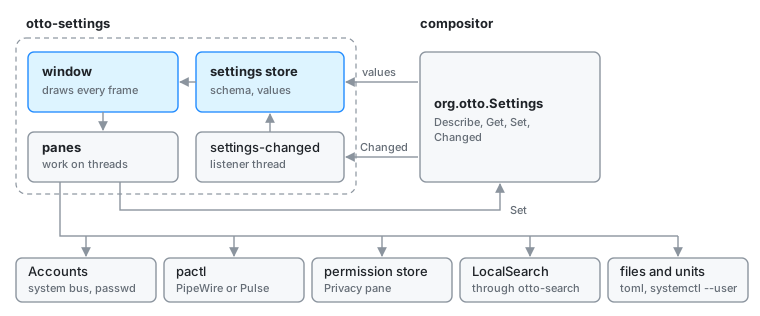
Startup. main sets the language from the desktop, then
settings_client::connect fetches the schema (Describe), the values and the
overridden set over a blocking zbus connection and fills the store. A thread
named settings-changed then follows the Changed signal, updates the store
and sets a dirty flag. The window reads the store on every frame without
touching the bus, and on_update turns the flag into a redraw. With no
compositor answering, the store stays offline: panes draw the placeholders in
model.rs and the app presents itself as read-only.
Rows. A row carrying a setting’s identifier takes its type, range, help
text and whether it applies live or on restart from the schema, and a change
is a Set call. The identifiers are the compositor’s
(src/settings/schema.rs at the repository root); the wire contract is in
Settings D-Bus API. The colour scheme and accent rows
(theme_scheme, accent_color) are settings like any other; how they reach applications is in
Color Scheme.
Window. One otto-kit Window. The pane scrolls in a ScrollPane, whose
content sits in subsurfaces over the window’s buffer (see
Scroll pane), so the search list and the Users sheet are
subsurfaces of their own stacked above them. The window publishes an
accessible tree through otto-kit (see Accessibility).
Threads. The draw path must not block. Bus calls, pactl, systemctl
and file scans run on threads of their own and wake the loop when done.
Panes that go elsewhere
| Pane | Talks to |
|---|---|
Users (account.rs) | org.freedesktop.Accounts on the system bus; passwd for password changes |
Sound (sound.rs) | pactl, which reaches PipeWire through pipewire-pulse or PulseAudio |
Privacy (privacy.rs) | xdg-permission-store, to list and revoke what apps were allowed (see Permissions) |
Search (search.rs) | LocalSearch, through otto-search, and systemctl --user for its service (see File search) |
Agents (agents.rs) | writes agents.toml; reads the state of the otto-agents units and restarts them through systemctl --user |
Dictation (dictation.rs) | writes dictation.toml; switches the otto-stt-<engine> units (see otto-dictate) |
Appearance, desk group (desk.rs) | writes the [desk] section of files.toml |
Lock & Login, startup group (startup.rs) | writes the [[exec_once]] list in config.toml; adds entries through the portal’s file chooser |
Every file is written with toml_edit, one key at a time, so comments and
keys the pane does not show stay as they were. Each file has a reader
elsewhere (otto-agents, otto-files, otto-kit’s dictation config, the
compositor), and their keys have to stay in step.
Dependencies
otto-kit for the window, drawing, widgets, the scroll pane, the portal file
chooser, i18n and the org.otto.Settings proxy from
otto-dbus. otto-search for the Search pane. sha-crypt and
zeroize for the Users pane, xcursor for cursor previews, chrono to
preview clock formats the way otto-bar renders them.
Going deeper
- Spec: settings app. User guide: Settings.
- Settings D-Bus API, Color Scheme, Permissions, Scroll pane.
- Build, run and test notes, including
--pane,--settingand--png: AGENTS.md.