← Otto Developer Guideotto-preview
otto-preview is the app people know as Studio, in
components/otto-preview/. It shows one file in a window of its own, drawn
exactly as Peek draws it over the file list, because it wraps the same Peek
session. Beside the document it can host an agent chat, and it fills and
marks up PDFs, saving into the file. The program, its app id and its bus name
are otto-preview; the desktop entry, the top bar and the dock call it
Studio. It sits in the app layer of architecture.toml. It runs as one
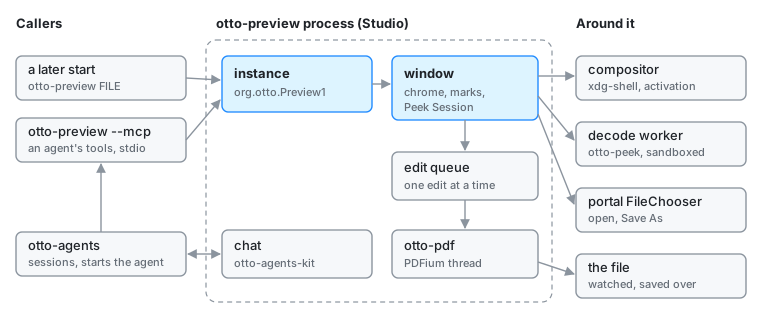
process per session that serves every Studio window, plus a short-lived
otto-preview --mcp process for each agent that uses its document tools.
Modules
| Module | What it does |
|---|---|
main.rs | Arguments (--chat, --session URI, a path), the --mcp branch, and the hand-off to a running instance |
instance.rs | org.otto.Preview1: opening files, and the document tools an agent reaches through --mcp |
app.rs | The window, its input, and the work it sends off the UI thread: decodes, pages, the text layer, recognition |
viewer.rs, content.rs | What the window shows around and under the Peek Session, drawn with otto_peek::draw |
chrome.rs, sidebar.rs, cursors.rs | The titlebar and toolbar, the pages sidebar, the pen and bin cursors |
commands.rs, shortcuts.rs | The one list of commands the menus, keys and shortcuts sheet all read, and the sheet itself |
marks.rs | Marks the person draws to point at something and the agent draws to point back, in the document’s own coordinates |
editing.rs, edit_queue.rs, signature.rs | Filling a PDF’s form and marking it up through otto-pdf; the queue every edit, undo, redo and save waits in; the person’s kept signature |
chat.rs | The chat panel beside the document, around otto-agents-kit’s conversation and log |
mcp.rs, pdf_tools.rs | otto-preview --mcp, the MCP server an agent starts, and the JSON form of the PDF’s fields and annotations |
versions.rs | Copies of the file kept while an agent works on it |
confirm.rs, file_dialog.rs, picking.rs | The unsaved-changes questions, the portal’s open and save dialogs, and the empty window shown when Studio starts with no file |
How it runs
- One instance. The first start claims
org.otto.Preview1on the session bus. A later start callsOpenon it with the path and its xdg-activation token, then exits. The running instance opens the file in a new window, or brings forward the window already showing it. Started with no file, Studio opens an empty window, exports it with xdg-foreign, and asks the desktop portal’sFileChooserfor a file with that window as the parent. - The window. An otto-kit app on an xdg toplevel. Its content is an
otto_peek::session::Session, so zoom, pan, pages, selection and playback behave as they do in Peek. Decodes, page rasterising, the PDF text layer and text recognition run on blocking tasks of a tokio runtime and wake the UI loop when they land. The file’s folder is watched, and the window shows the file again when it changes on disk. - The decoder. Untrusted bytes are parsed in Peek’s sandboxed decode
worker, which is this binary run again.
otto_peek::run_worker_if_requested()is the first call inmain, before--mcpand before any thread. See otto-peek. - PDF editing. When PDFium is present, an open PDF is also opened through
otto-pdf. Every edit, undo, redo and save goes through
edit_queue.rson a thread of its own, one at a time, and pages are drawn from the document in memory so unsaved changes show. Save As goes through the portal’sFileChooser. - The chat. The panel uses otto-agents-kit’s
AskandChatView, which talk to theotto-agentsservice. A session started from Studio carries the file as its subject, and_meta.otto.mcpServersnaming this program with--mcp, so the agent gets the document tools. See Agents. - The MCP server.
otto-preview --mcpspeaks MCP over stdio, with the document’s path inOTTO_PREVIEW_DOC. It holds no state and never touches the display: eachpreview_*tool (info, render, marks, draw, clear, fields, annotations, edit, reload, versions, revert) is one call to the running instance overorg.otto.Preview1. - Files it keeps. Versions of a file, once a chat about it has started, under
$XDG_STATE_HOME/otto-preview/versions/. The person’s signature, as strokes, in$XDG_DATA_HOME/otto/signature.json. Text recognition follows the[peek]section of~/.config/otto/files.toml, which Files reads too.
What it depends on
otto-kit for the window and drawing, otto-peek for the session and the
decoder, otto-media-kit without default features for playback,
otto-pdf for editing, and otto-agents-kit (with dictation) and
otto-agents-client for the chat. Nothing links Studio. It is launched from
its desktop entry, by xdg-open, and by the agent UIs when a session is
about a file.
Going deeper
- Spec: Studio, with Peek for what the content does.
- File Previews for the decoder and the drawing it shares with Files.
- Build and test notes: AGENTS.md.