← Otto Developer Guideotto-msg
User guide: Scripting Otto, Reporting a bug
Specs: Window Tiling
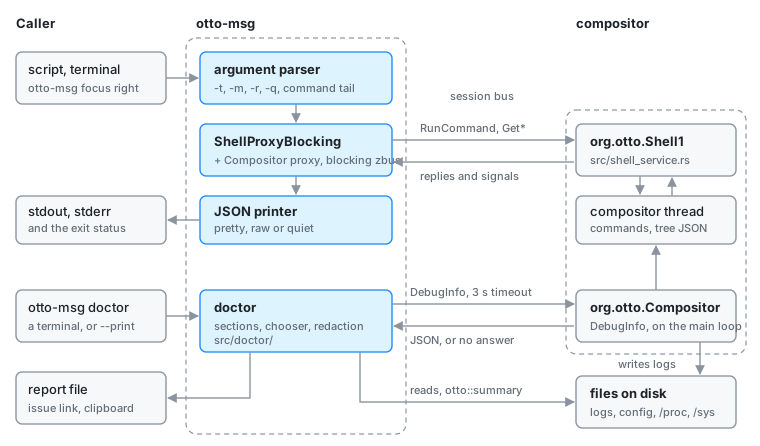
components/otto-msg/ is a command-line tool that runs i3-syntax commands
against Otto, prints the window tree, workspaces, outputs, inputs and the
compositor’s debug info as JSON, and follows events. Its doctor subcommand
writes a bug report. It is a client of the compositor’s org.otto.Shell1 and
org.otto.Compositor D-Bus services and has no Wayland connection of its
own. Each invocation is a short-lived process that makes one call (or one
subscription) on the session bus and exits. It sits in the app layer of
architecture.toml; nothing depends on it, and the Otto plugin’s skills call
it.
The command grammar and the JSON shapes are i3’s, so a script written for
i3-msg or swaymsg ports with a rename.
Where the code is
| Module | What it does |
|---|---|
src/main.rs | argument parsing, one call per -t type, JSON printing; hands doctor and everything after it to doctor::main |
src/doctor/mod.rs | doctor’s options; chooses between the interface, --print and a non-interactive write; writes the file, copies it, prints the issue link |
src/doctor/sections.rs | each section’s reader, all of them reading through Sources (a root folder, the log folder, the configuration files and the compositor’s answer) |
src/doctor/compositor.rs | the DebugInfo call and its JSON |
src/doctor/logs.rs | where Otto’s logs are |
src/doctor/summary.rs | the last otto::summary line in a log, read when the compositor cannot answer |
src/doctor/redact.rs | takes personal details out of the text |
src/doctor/report.rs | the Markdown report, its file name and the pre-filled issue link |
src/doctor/term.rs, tui.rs | raw mode, the alternate screen and key parsing; the chooser on top of them |
Message types
-t picks the message type. Both the underscored and the hyphenated
spellings are accepted (get_tree, get-tree).
-t | Call | Output |
|---|---|---|
run_command (default) | org.otto.Shell1.RunCommand(s) → a(bs) | one {"success": …} object per ;-separated command, with error on the ones that failed |
get_tree | org.otto.Shell1.GetTree() → s | the tree, i3’s GET_TREE shape |
get_workspaces | org.otto.Shell1.GetWorkspaces() → s | i3’s GET_WORKSPACES shape |
get_outputs | org.otto.Shell1.GetOutputs() → s | i3’s GET_OUTPUTS shape |
get_inputs | org.otto.Shell1.GetInputs() → s | sway’s GET_INPUTS shape |
get_debug_info | org.otto.Compositor.DebugInfo() → s | version, backend, renderer, configuration files, log path and outputs |
subscribe | org.otto.Shell1’s signals | each matching event’s JSON payload |
The getters answer with a JSON string. otto-msg parses it and pretty-prints
it (or prints it on one line with -r); a string that is not JSON is passed
through as it came.
How it runs
- It connects to the session bus with blocking zbus and builds a
ShellProxyBlockingfrom otto-dbus, or aCompositorProxyBlockingforget_debug_info. It talks to whichever Otto owns the name. - Options end at the first word that is not an option, so
otto-msg resize shrink width -10 pptreads-10as part of the command. The parser is hand-written for that reason. - For
run_command, the reply goes to stdout as JSON and each failure’s message also goes to stderr. The exit status is non-zero if any command failed, so-q(print nothing) still answers through the exit status. subscribetakes a JSON array of event names, or bare names. It listens to every signal on the proxy and mapsWorkspaceChangedtoworkspaceandWindowChangedtowindow; those two are the names it accepts. Without-mit prints the first matching event and exits; with-mit keeps printing.
otto-msg doctor
When the first argument is doctor, the rest of the command line is
doctor’s own: --no-redact, --print, --output <path>, --lines <n>
and --no-clipboard. It gathers what a bug report needs, lets the user
choose what to share, and writes one Markdown file. It sends nothing
anywhere.
Sections
Every section is selected by default.
| Section | Read from |
|---|---|
| Operating system | PRETTY_NAME (or NAME and VERSION_ID) from /etc/os-release or /usr/lib/os-release; the kernel from /proc/sys/kernel/osrelease |
| Graphics | each card<N> under /sys/class/drm: PCI vendor and device, kernel driver, boot VGA; the renderer and any Vulkan fallback from DebugInfo |
| Screens | the outputs in DebugInfo: mode, refresh, scale, position, virtual or not |
| Otto | version, commit, backend and the configuration files read, from DebugInfo; otto-msg’s own version |
| Configuration | each configuration file, whole, in a fenced toml block |
| Session logs | the last lines of each log (2000 by default, --lines changes it), colours stripped, at most 8 MiB read from the end of a file |
The configuration files are the ones DebugInfo lists. When the compositor
does not answer, it reads the usual locations instead (the system and user
config.toml, and otto_config.toml, otto_config.tty-udev.toml and
otto_config.udev.toml in the home folder) and says so in the section.
The compositor’s details
src/doctor/compositor.rs calls org.otto.Compositor.DebugInfo with a
three-second timeout: the call goes through the compositor’s main loop, and a
report about a frozen session is when this tool runs. The answer is the JSON
object described in Compositor D-Bus API.
When the call fails (Otto crashed, is frozen, or is too old to have the
method), summary.rs looks for the last otto::summary line in the logs.
The compositor logs that line, holding the same JSON, once its renderer and
an output are up and again whenever the outputs change. Only log files are
searched, not the journal or the panic log. The Graphics, Screens and Otto
sections then carry a “Not live” note naming the log and the reason. With no
such line either, they say the compositor could not be reached.
Where the logs are
logs.rs lists them in this order, skipping a file already listed under
another path:
- The file
DebugInforeports aslog_path, and the same name with.1(the previous session). otto.logandotto.log.1in$XDG_STATE_HOME/otto.- For each running
ottoprocess of this user (bycomm, or by the executable’s name), its stderr: read through/proc/<pid>/fd/2when that is a regular file, or withjournalctl _PID=<pid>(the user journal, then the system one) when it is a socket and the process hasJOURNAL_STREAMset. session.logandsession.log.1, kept by theotto-sessionlogin script.panic.log, every recorded crash.
Writing the report
- With
--print, or when stdout is not a terminal, the report goes to stdout. With a terminal on stdin and stdout, the chooser opens: tick and untick sections, preview each one, toggle redaction withr, then write or quit. Without a terminal on stdin it writes straight away. - The file goes to
--output, or to$XDG_STATE_HOME/otto/otto-report-YYYYMMDD-HHMMSS.md. WithWAYLAND_DISPLAYset andwl-copyinstalled, the text is also copied to the clipboard, unless--no-clipboardis given. - It prints a link to a new issue on GitHub with the short system sections (operating system, graphics, screens, Otto) filled in, trimmed to fit 6000 characters; the user attaches the file.
- Redaction is on unless
--no-redactis given. The home folder becomes~, the user and host names<user>and<host>, and IPv4, IPv6 and MAC addresses<ipv4>,<ipv6>and<mac>; loopback and unspecified addresses stay. The preview shows the text after redaction, so what the user reads is what is written.
Who it talks to
| Peer | How |
|---|---|
| Compositor, shell | org.otto.Shell1 at /org/otto/Shell1, served by src/shell_service.rs. Each call is handed to the compositor thread over a calloop channel and answered on a oneshot |
| Compositor, debug info | org.otto.Compositor.DebugInfo at /org/otto/Compositor, served by src/screenshare/dbus_service.rs and answered on the main loop; the JSON is built in src/debug_info.rs |
| Command parser | src/shell/commands.rs and src/workspaces/tiling/command.rs in the compositor, behind RunCommand |
| otto-dbus | the ShellProxyBlocking and CompositorProxyBlocking proxies and the interface definitions |
The system (doctor) | /etc, /proc and /sys/class/drm, Otto’s log files, journalctl, wl-copy |
Its dependencies are zbus, otto-dbus, otto-foundations (XDG folders),
serde_json and libc. The terminal interface uses no UI crate.
Going deeper
- Shell D-Bus API is the wire contract for the commands: every method, the command language, the JSON shapes, the signals and the errors. A change to the commands or the JSON goes there and into the user guide, Scripting.
- Compositor D-Bus API is the contract for
DebugInfoand theotto::summarylog line. A change there goes into Reporting a bug too. - specs/tiling.md and Tiling plan
hold the behaviour the commands drive; specs/bug-reports.md
holds
doctor’s. - components/otto-msg/AGENTS.md has the
build and test notes.
cargo test -p otto-msgcovers argument parsing and, fordoctor, redaction, the section readers over a fixture root, log discovery, the report and key parsing. The commands themselves are tested in the compositor withcargo test --features headless --test tiling_scripting, andDebugInfowith--test debug_info.