← Otto Developer Guideotto-lock
User guide: Lock Screen
Specs: Lock Screen
otto-lock is Otto’s screen locker. It takes the lock with
ext-session-lock-v1, draws the shared password panel on every output,
authenticates the session’s own user against PAM, and only then gives the
session back. It lives in components/otto-lock/ and sits in the app
layer of architecture.toml. It runs as one process for the length of a lock,
started by the compositor when the session locks.
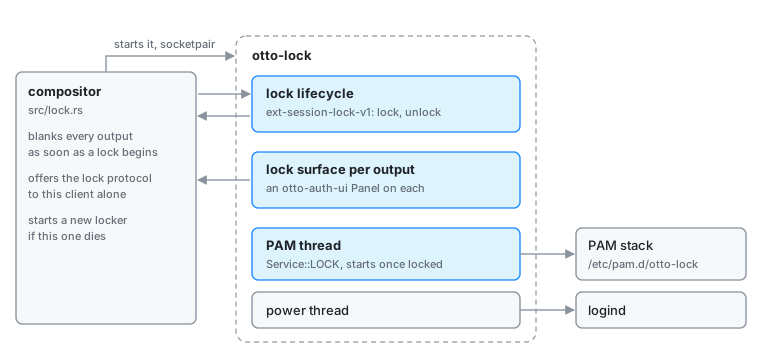
The lock itself lives in the compositor. The locker only proves who is at the
keyboard: nothing in it can unlock a session it did not lock, and a locker
that crashes leaves the screen blank, never the desktop. How the compositor
side behaves (the blank, restarts, suspend, inhibitors and grabs) is on
Permissions and in src/lock.rs.
Parts
| Part | What it does |
|---|---|
src/main.rs | The whole client: the lock lifecycle, one lock surface and panel per output, keyboard and pointer input, the PAM attempt, the power buttons and the clock. |
otto-lock.pam | The PAM stack the packages install as /etc/pam.d/otto-lock: pam_fprintd as sufficient, then the system’s login stack. |
examples/lock_cycle.rs | Locks, waits, and unlocks with no PAM, to exercise the protocol lifecycle. |
How it runs
- The compositor starts the locker on a socketpair (
WAYLAND_SOCKET) marked as its locker, the only client offeredext_session_lock_manager_v1. The command is[lock] locker_command, orOTTO_LOCKER_COMMAND. - On start the locker asks for the lock at once. The compositor blanks every output before it answers.
- It creates a lock surface for each output, follows outputs as they come and
go, and builds an
otto-auth-uipanel on each with the session picker hidden and the power buttons offered. - Only after
lockedarrives does it start authenticating, so a fingerprint reader cannot unlock a desktop that is still on screen. The PAM attempt runsService::LOCKfromotto-auth-uion a thread of its own: theotto-lockservice, elsesystem-auth, elselogin.OTTO_LOCK_PAM_SERVICEnames another service. - PAM’s prompts and messages drive the panel. A wrong answer shows PAM’s reason and starts the next attempt after a short floor, so a stack that cannot run at all does not spin. PAM’s own delay is what makes a wrong password cost time.
- On success the locker unlocks and exits. After a recognised fingerprint it first lets the mark finish, bounded by a short timeout.
If the compositor answers finished instead of locked, something else holds
the lock, and the locker exits. If the locker dies, the compositor starts a new
one, which takes over the standing lock.
Between events the loop sleeps. It wakes for PAM, for input, for a transition
or the fingerprint mark, and once a minute for the clock. Painting waits for
the compositor’s frame callbacks, bounded by otto-auth-ui’s
frame_in_flight.
Dependencies
otto-auth-ui with its pam feature (the panel, the PAM conversation and the
logind power calls), otto-kit for the session-lock surfaces, drawing and
i18n, smithay-client-toolkit and wayland-protocols for the protocol.
Going deeper
- Lock screen spec and the user guide Lock screen.
- otto-auth-ui for the panel and the PAM thread.
- Testing an uninstalled build in a nested compositor is in AGENTS.md.