← Otto Developer Guideotto-kit
User guide: Theming
Specs: Window Decorations, otto-kit Window Focus, Accessibility, Background Effect, Localisation
components/otto-kit/ is the crate every Otto application is built on, and the
one the compositor draws its own chrome with. It is a Wayland client runtime,
a Skia drawing layer, a widget set and a design system in one crate.
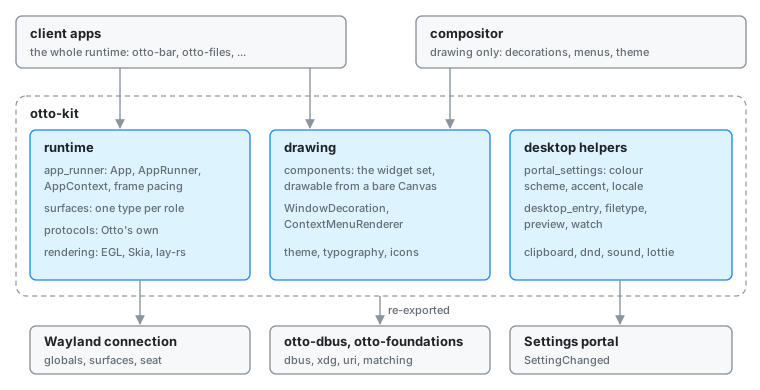
It has two consumers, and they use it in opposite ways.
- Client apps: otto-bar, otto-islands, otto-launcher, otto-settings,
otto-files, otto-peek, otto-emoji, otto-lock, otto-greeter, otto-auth-ui.
They take the runtime (
AppRunner,AppContext, surfaces, protocols) and then either draw their own Skia or assemble components. - The compositor, where
src/has noAppRunner, noAppContextand nowl_surface. It calls the drawing half only:WindowDecorationandWindowControlfor server-side decorations,ContextMenuRendererfor the dock and top-bar menus, andtheme,typographyandiconseverywhere.
That split is the crate’s main design constraint: anything in components/
must be drawable from a bare &Canvas, with no connection, no event loop and
no ownership of a surface. A component that needs to be told about a click
takes a state struct the caller owns and hands events to; it never subscribes
to anything itself.
Layout
components/otto-kit/src/
├── app_runner/       The event loop: App trait, AppRunner, AppContext
├── surfaces/         One type per Wayland surface role
├── rendering/        EGL + Skia surface, and the lay-rs renderer
├── components/       The widget set
├── focus.rs          Keyboard focus order and the focus ring
├── accessibility/    AccessKit trees and the per-surface adapter
├── theme.rs          Palette, and ColorScheme
├── typography.rs     Named text styles
├── icons.rs          Icon lookup
├── icon_theme.rs     freedesktop icon theme resolution
├── accent.rs         Accent colour, from the settings portal
├── color_scheme.rs   Light/dark, from the settings portal or OTTO_COLOR_SCHEME
├── portal_settings.rs The one Settings portal client the watchers share
├── protocols/        Otto's own Wayland protocols, generated
├── desktop_entry.rs  .desktop parsing
├── filetype/         MIME lookup by glob and content
├── watch.rs          Directory watching (inotify), waking the event loop
├── preview/          File thumbnails
├── clipboard.rs      Selection ownership and paste
├── dnd.rs            Drag and drop
├── input.rs          Keyboard/pointer helpers
├── lottie.rs         Lottie animation playback
├── sound.rs          Feedback sounds
└── testing.rs        SHM-only test client (feature `testing`)
The application model
An app implements App and hands it to AppRunner:
use otto_kit::{App, AppContext, AppRunner};

struct MyApp { /* … */ }

impl App for MyApp {
    fn on_app_ready(&mut self, _ctx: &AppContext) -> Result<(), Box<dyn std::error::Error>> {
        // Connected; globals bound. Create surfaces here.
        Ok(())
    }
}

fn main() -> Result<(), Box<dyn std::error::Error>> {
    AppRunner::new(MyApp::new()).run()
}
AppRunner owns the connection, the event queue and the seat, and drives the
App through a lifecycle: on_start, on_app_ready, then the callbacks for
what happens next: on_configure for a toplevel, on_configure_layer for a
layer surface, on_configure_lock_surface / on_session_locked /
on_session_lock_finished for a locker, on_keyboard_event, pointer and
gesture callbacks, and on_close. Everything except on_app_ready has a
default no-op, so an app implements only the roles it plays.
AppContext is the handle to everything the runtime bound. Most of it is
associated functions on globals, not methods: AppContext::outputs(),
AppContext::fractional_scale(), AppContext::wlr_layer_shell(),
AppContext::current_theme(). This is deliberate: a draw closure or a
component deep in a view tree needs the scale or the theme without being handed
a context reference through every layer above it. The *_ref methods exist for
the paths that do have a context.
The scale is per surface. Each surface is drawn at the preferred_scale the
compositor sends for it (AppContext::surface_scale), which follows it from
display to display: its buffer is round(logical × scale) pixels, shown 1:1
through a wp_viewport at a fractional scale, and the canvas a draw closure
gets is already scaled, so it works in points. When a surface’s scale moves,
its next draw resizes the buffer and repaints its layer tree, and
App::on_scale_changed (by default handled as a theme change) tells the app
to make that draw. AppContext::fractional_scale() is for code with no
surface in hand: inside a draw it is the drawing surface’s scale.
AppContext::scale_factor() rounds that up to the whole number icons and
images are rasterised at. A client that paints its own wl_shm buffers gets
the same sums from surfaces::ScaledSurface.
Surfaces
One type per role, all implementing BaseWaylandSurface:
| Type | Role |
|---|---|
ToplevelSurface | An ordinary application window (xdg_toplevel) |
LayerShellSurface | A panel or overlay (zwlr_layer_shell_v1) |
PopupSurface | A menu or dropdown, anchored to a parent (xdg_popup) |
SubsurfaceSurface | A child surface positioned in its parent’s coordinates |
SessionLockSurface | A locker’s per-output surface (ext-session-lock-v1) |
DockItem | A surface the dock hosts, via Otto’s otto-dock-v1 |
Window (components/window/) sits above ToplevelSurface and adds a title
bar, resize affordances and a content area. Note who actually uses it:
otto-settings, otto-files and the examples. Every other app is layer-shell,
subsurface or session-lock, and draws its own frame — which is why Window is
thinner than its name suggests.
Frame pacing
A surface paints when the compositor says the last frame is on screen. The
runtime tracks a frame callback per surface: a paint requested while one is in
flight is held, and frame() clears the flag and dispatches the pending paint.
An app that redraws in a tight loop is therefore throttled to the output’s
refresh rate without doing anything itself, and one that redraws on a timer
never gets ahead of the compositor.
Drawing
Two paths, and an app picks one:
Straight Skia. Get a canvas for the surface and draw. This is what otto-islands, otto-lock, otto-greeter and most of otto-bar do. They own a model and paint a bespoke view of it every frame.
The lay-rs engine. Call AppContext::enable_layer_engine(w, h) before
creating a surface, and the app gets the same retained scene graph the
compositor uses: layers with positions, opacity, blur, corner radius and spring
animations, updated on a background ticker and drawn with draw_scene. Use it
when the UI animates. The order matters: the engine has to exist before the
surface, because a surface builds its root layer node when it is created.
rendering/ holds the pieces underneath both: SkiaContext (the shared
DirectContext), SkiaSurface and EglSurfaceResources (per-surface EGL), and
LayersRenderer (the lay-rs engine plus its update thread).
See The Scene Graph and Layers for the engine itself; it is the same one the compositor runs.
Components
Two shapes, for the reason described at the top:
Stateless Renderable builders, a value that knows how to paint itself.
Label::new("Cursor size").with_style(styles::SUBHEADLINE).render(canvas);
Retained state plus an immediate-mode renderer, for anything interactive.
The caller owns a state struct, calls render_at(canvas, w, h) to draw it, and
feeds it on_pointer_down / on_pointer_drag / on_pointer_up / on_key,
each returning a response describing what changed. TextInput is the model;
the form controls, scroll view, dropdown, slider and context menu all follow
it.
Every component, with a picture of it, its shape and the crates that use it, is in the otto-kit library.
WindowDecoration (which builds a Titlebar), WindowControl and
ContextMenuRenderer are the ones the compositor draws directly, so a change
to them lands on server-side decorations and the dock’s menus at the same time
as on apps.
Theme, typography and icons
theme::Theme is the palette. It is derived, not configured by the app:
AppContext::current_theme() is Theme::for_scheme(current_color_scheme()),
with the accent folded in.
Both inputs come from the freedesktop settings portal:
org.freedesktop.appearance’s color-scheme and accent-color, read once at
startup and then watched for SettingChanged, each kept in an atomic. So every
otto-kit app follows the user’s light/dark and accent choice with no code, and
switches live. The portal backend is optional, so light/dark has a second
source: the compositor publishes its configured scheme as OTTO_COLOR_SCHEME,
which color_scheme.rs falls back to when the portal has answered nothing.
That path is startup-only, and always outranked by the portal. Otto’s own
backend for that portal is
xdg-desktop-portal-otto; see
Color Scheme for the whole path.
The watchers share one portal client, portal_settings.rs: one session
connection and one SettingChanged subscription, fanned out by namespace and
key to whichever watcher follows it.
Otto’s own D-Bus interfaces (org.otto.Settings, org.otto.Shell1, …) have
their client proxies in the UI-free otto-dbus crate, re-exported here as
otto_kit::dbus; see otto-dbus.
typography::styles holds the named text styles (SUBHEADLINE and friends);
icons and icon_theme resolve icon names against the user’s icon theme.
The glyphs Otto’s own interface draws come from the vendored Solar set
before the theme (see scripts/README.md for how the set is kept). The set
is found at $OTTO_SOLAR_ICONS, then <exe>/../share/otto/icons/solar, then
/usr/share/otto/icons/solar, then the repository’s
resources/icons/solar, so a development build needs no install.
icons::solar_icon(name, size, SolarStyle, color) rasterises one glyph with
its currentColor set to color (the colour on the root <svg>, the alpha
as its group opacity), cached by name, size, style and colour; a bold request
for a glyph kept only in linear gets the linear file. named_icon,
named_icon_sized and the small-size cached_icon_chain lookups answer a
Solar name with its glyph in black ink, which callers tint with SrcIn as
they do a theme’s symbolic art. folder is left to the theme there, since a
listing asks for it as a file type; cached_glyph_chain is the variant for a
caller that draws every icon as a glyph (Files’ sidebar and path bar).
exact_icon_in_theme and find_icon stay theme-only. Whatever the lookup,
the image is put on a canvas with icons::draw_icon(canvas, image, dst, paint), the one place that samples an icon: a 1:1 draw is snapped to whole
device pixels, anything else sampled linear with mipmaps, so a glyph at a
fractional scale never lands on half a pixel. The image-sampling-explicit
architecture rule keeps draw_image out of everything else.
Otto’s own protocols
src/protocols/ generates client bindings from the XML in the repository’s
top-level protocols/:
otto-surface-style-unstable-v1lets a client hand the compositor a surface’s size, position, corner radius, blur, shadow and colour, and have them animated server-side with springs. This is what makes the dynamic island morph rather than cross-fade: the geometry is animated by Otto, and the content is drawn once at the target size. See Surface Style Protocol.otto-dock-v1is the dock’s client-side contract: publishing a dock item, and pushing per-app badge counts and progress. otto-islands uses the badge half to put unread notification counts on dock icons.otto-text-cursor-v1carries where the desktop’s text cursor is, as applications last reported it throughzwp_text_input_v3.set_cursor_rectangle, so a picker or completion popup can put itself beside the caret rather than in the middle of the screen.
Everything else
desktop_entry parses .desktop files (the dock and launcher’s app database);
filetype resolves MIME types by glob and by content sniffing, and preview
renders file thumbnails against the shared freedesktop cache, both for
otto-files and otto-peek. clipboard and dnd cover selections and drag
and drop: clipboard::set_text and clipboard::text are the plain-text pair
a text field needs, since TextInput owns no clipboard itself: it answers a
Copy or Cut key with TextInputResponse::Clipboard(text) for the host to
offer, and takes a paste as TextInputKey::Paste(text) already read. sound
plays feedback sounds, and lottie plays Lottie animations
(the greeter and lock screen use it).
Building and running
cargo build -p otto-kit
cargo run -p otto-kit --example simple_app
The examples/ directory is the practical reference, around three dozen,
one per component or surface pattern: simple_app (toplevel + menu),
window_with_titlebar, sidebar_window, form_controls_gallery,
list_gallery, dropdown_gallery, titlebar_gallery, scroll_ab,
blur_window and dock_application_layer (layer-shell and
dock surfaces), plus probes like output_probe and clip_children_probe.
Run any of them against a development compositor:
cargo run -- --winit &
WAYLAND_DISPLAY=wayland-1 cargo run -p otto-kit --example form_controls_gallery
Testing
The testing feature exposes otto_kit::testing::TestClient, a minimal
Wayland client built on SHM buffers, with no EGL, Skia or AppRunner. It
exists so the compositor’s end-to-end tests can drive real clients:
let mut client = TestClient::connect("wayland-1").unwrap();
let toplevel = client.create_toplevel("test-window", 200, 150);
client.roundtrip().unwrap();
assert!(toplevel.lock().unwrap().configured);
Those tests live in the compositor’s tests/ and run behind its headless
feature; see Project Structure.
Where the gaps are
otto-kit Roadmap is the gap analysis: which parts of the toolkit an app still has to work around, and the order the remaining pieces are being built in. This page describes what exists; that one describes what does not.