← Otto Developer Guideotto-islands
User guide: Dynamic Island
Specs: Dynamic Island, Notification Island, Notification Daemon, Portal Access Dialog
otto-islands is the strip of bubbles at the top centre of the screen. It does
three jobs for the session. It is the notification daemon: anything that calls
org.freedesktop.Notifications (notify-send, a browser, a mail client) ends up
here. It shows activities: running tasks other programs report over D-Bus, and
the track a media player is playing. And it draws the system dialog: the
permission and question panel that the portal backend, the agent service and
the log-out menu ask through. It runs as its own process, an otto-kit app on a
layer-shell surface, started by the compositor from an exec_once entry in the
shipped config. The compositor knows nothing about it beyond that.
The model
Three ideas carry the whole design.
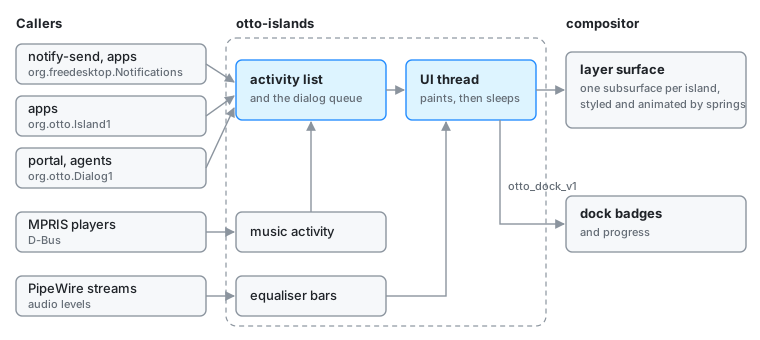
Everything is an activity. A notification, a running download, the music player: each is one activity in a single shared list, with an app id, a title, a body, an icon, and optionally progress, actions and a timeout. The D-Bus services only edit that list and wake the UI. The UI reads the list and makes the screen match it. Nothing on the D-Bus side touches a surface.
One island is one activity, and one subsurface. The layer surface is a transparent container. Each activity gets its own Wayland subsurface, and that subsurface lives as long as the activity does. It is never swapped for another to change shape: the same bubble grows from a circle (Mini) to a pill (Compact) to a card (Expanded) and back. Activities from the same app overlap into a deck rather than being folded into one representative, so every notification stays addressable.
The compositor animates, the client only paints. Shape, corner radius, blur, shadow, position and size are set through the surface style protocol, and every change is a spring the compositor runs. The client redraws a buffer only when what it shows changes, and between those moments it sleeps.
Start to finish: a notification
- An app calls
Notifyon the session bus. The call lands on a tokio task in otto-islands that owns theorg.freedesktop.Notificationsname. - The daemon works out who sent it. It asks the bus for the caller’s process,
then takes the Flatpak sandbox’s own record of its app id, or else the
desktop-entryhint, or else the desktop entry that runs the process’s executable. A notification passed on by xdg-desktop-portal was already checked there and goes through as is. - It looks that app up in the
notificationstable of the permission store. An app the table has never seen is recorded as allowed, so Settings can list it and switch it off. An app switched off is dropped, but the caller still gets an id back, from a range nothing on screen uses. See Permissions for the table. - The daemon adds an activity to the shared list (or updates one in place for
replaces_id), marks the list dirty and wakes the UI thread. - The UI thread reconciles. It hands the whole list to the dock first, then drops the quiet activities and diffs the rest against its islands: a new activity gets a new subsurface, a gone one is animated out and destroyed a moment later, once the exit animation has played.
- Layout places the row. Islands are grouped into decks by app id, groups are ordered by their oldest notification, and the row is centred, so a growing island pushes its neighbours both ways. The push cascades outward one island at a time.
- Each island’s new mode, size and position go to the compositor as one spring transaction. The buffer is redrawn only if its content signature (mode, icon, text, actions, size) changed.
- A new notification opens Expanded so it can be read on sight. After a few seconds, unless the pointer is on it, it settles back to Mini. When its timeout runs out it is marked expired and stops announcing itself, but it stays in the list: it has not been read.
- The dock reads the same list. Every app with outstanding notifications gets
a badge with the count, published through
otto_dock_v1. - The user opens the island and clicks it. A click on an action, or on the
body for the default action, emits
ActionInvoked, asks the compositor to focus the app, removes the activity and emitsNotificationClosed. A click on the Close zone only removes it and emitsNotificationClosed. The badge drops by one on the next sync.
The full presentation rules (modes, decks, arrival, hover, click targets) are in the notification island spec.
Activities, music and the dialog
Running tasks. org.otto.Island1 lets any process create, update and
dismiss an activity. A live activity is a job, not news: it ignores its
timeout, ends only when its app says so, and shows its progress as a ring or a
bar. The same progress fills the app’s dock icon. A quiet activity is
reported to the dock and left out of the row. The app sets it while its own
window is in front, where a bubble would only repeat what the window says.
Music. otto-islands is also an MPRIS client. It follows the session’s
players on its own threads and keeps one live activity, with the app id
org.otto.music, in step with whatever is playing. It goes quiet while the
player’s window is focused. The equaliser bars sit on a child subsurface of the
music island, the one thing redrawn on a timer, and only while a track plays.
They are measured from the player’s own PipeWire stream, matched by process or
by name, never from the default output. The capture stream is open only while
the bars move. A player with no presence in the PipeWire graph is taken to be
playing on another device, and a cast glyph stands in for the bars.
The dialog. org.otto.Dialog1 presents one panel at a time from a queue.
A request is a title, a body, an icon and zero or more choice groups, the shape
of the portal’s Access interface. The D-Bus call blocks until the user answers,
and the answer travels back to it on a one-shot channel. A dialog whose caller
has stopped waiting is answered as ended and taken down, and a caller can
withdraw its own by cookie. A modal dialog takes the keyboard exclusively and
catches clicks over the whole layer. A non-modal one takes the keyboard briefly
so it can be answered by typing, catches clicks only on itself, and shrinks
into a circle at the end of the row when the user moves on, still waiting. The
portal access dialog spec has the
contract.
Boundaries
- Wayland, to the compositor. One
wlr-layer-shelloverlay surface, anchored top, with an input region covering only the islands so clicks pass through everywhere else. A subsurface per island, one for the dialog panel and one for the equaliser.otto_surface_style_v1for every visual property and animation.otto_dock_v1for badges and progress: one dock item per app, kept for the life of the process. These protocols are Otto’s own, so the app runs only on Otto. - D-Bus, from the session. Two names, each on its own connection:
org.freedesktop.Notifications, andorg.otto.Islandservingorg.otto.Island1andorg.otto.Dialog1. Signals go out from the connection that owns the name, so receivers matching on the sender see them. The client proxies other crates use live in otto-dbus. - D-Bus, outward. The permission store for the
notificationstable,org.otto.Compositorto focus an app after an action,org.otto.Shell1to find the player’s window, and MPRIS to read and drive players. - PipeWire. A watcher of the graph’s output streams, and a capture stream on the matched one while the bars move.
- Threads. Wayland, layout and drawing run on the otto-kit app thread. The D-Bus services run on tokio tasks. MPRIS, the PipeWire watcher, the level meter and album-art loading have threads of their own. They meet in shared state behind mutexes, and the D-Bus side wakes the app thread rather than drawing anything itself.
- State. The activity list and the dialog queue are the one source of truth, owned by otto-islands and lost when it exits. The per-app permission lives in the permission store, which Settings also reads and writes. Islands, modes and the row’s layout are UI state on the app thread.
Decisions
- A client, not part of the compositor. The island is a regular layer-shell client. The compositor needs no island code, the island can be restarted on its own, and layer shell gives it the right stacking.
- D-Bus, not a Wayland protocol, for content. Callers send data (a title, a progress value, a list of choices), not surfaces. That covers notifications, jobs and prompts from any language, and no client ever draws inside the island.
- No animation loop in the client. All motion is compositor springs over retained buffers. The event loop sleeps until the next real deadline (an arrival window, the focus timeout, a notification timeout, a pending destroy) or a wakeup from D-Bus or Wayland. With nothing on screen it does no work at all.
- Decks instead of grouping. Collapsing an app’s notifications into one bubble hides which one you are looking at. Overlapping them keeps each one clickable, and fanning the deck on hover makes them easy to aim at.
- A timed-out notification is not gone. Expiry only stops it announcing itself. It still counts on the dock badge until someone dismisses it, since the dock is where an old unread message stays visible.
- The sender is named by its process, not its message. The permission check comes from who made the call, because a notification can claim any app name. When the permission store cannot be read, the answer is yes: a broken store must not silence every app.
- The dialog lives here. The island is already the session’s on-top, always-running surface. The portal backend brokers Access requests and otto-islands renders them, so the same panel serves Flatpak apps, screen sharing, agents and log-out. When otto-islands is not running, the portal backend falls back to other Access backends.
- A modal dialog holds exclusive keyboard focus. That is also how the compositor learns a prompt is up: it keeps compositing over a fullscreen window, which would otherwise be scanned out with the chrome hidden.
- The bars follow the player’s own stream. Listening to the whole output would move the bars for every sound on the machine. Closing the capture stream when the bars stop lets the sound card suspend.
Limits and direction
- The island appears on the primary output only.
- Nothing is configurable. Sizes and timings are compiled in, and the island’s band is taller than otto-bar’s without the two sharing a constant.
- Notifications do not survive a restart, even though the daemon advertises
the
persistencecapability. There is no history and no do-not-disturb. - A timeout never removes an activity. Only a dismissal does.
- Notifications never take the keyboard, and there is no shortcut to reach the row.
- One instance per session: a second copy cannot claim the bus names.
Open questions are tracked in the dynamic island spec.
See also
- Surface Style Protocol, Dock, Permissions, Agents, xdg-desktop-portal-otto, otto-dbus
- Specs: dynamic island, notification island, portal access dialog
- User guide: Dynamic island
- Working notes for contributors: AGENTS.md