← Otto Developer Guideotto-greeter
User guide: Login Greeter
Specs: Login Mode
otto-greeter is Otto’s login screen. greetd runs otto --login, a compositor
in login mode, and that compositor launches otto-greeter in place of the
usual autostart entries. The greeter draws the shared password panel on a
fullscreen overlay and drives the login conversation with greetd. It lives in
components/otto-greeter/ and sits in the app layer of
architecture.toml. It runs as one process for the length of a login, and
greetd replaces it with the user’s session once the login succeeds.
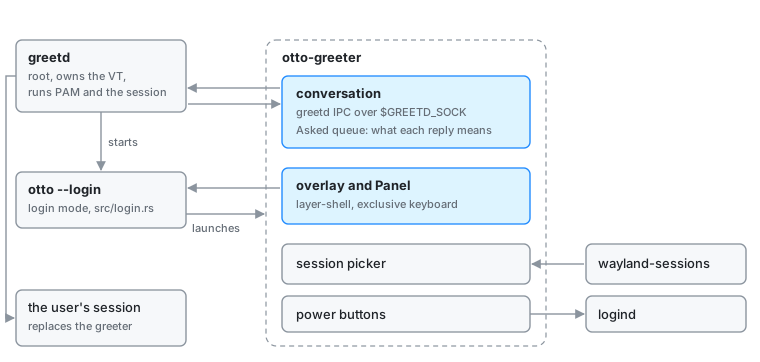
The greeter never links PAM. greetd runs as root, owns the VT, runs the PAM
stack and execs the session; the greeter only relays its questions and the
user’s answers. It uses otto-auth-ui without the pam feature.
Modules
| Module | What it does |
|---|---|
main.rs | The client: the layer surface, input, the session picker, the power buttons and the conversation state machine. |
greetd.rs | The greetd IPC client: a native-endian u32 length prefix and a JSON payload each way over $GREETD_SOCK (greetd-ipc(7)). Without the variable, a mock backend that accepts the password otto. |
session.rs | Finds the sessions to offer in /usr/share/wayland-sessions and /usr/local/share/wayland-sessions, and picks the preselected one. |
examples/fake_greetd.rs | A stand-in greetd daemon on a unix socket, with scenarios for a password, a fingerprint, two factors and a locked account. |
How it runs
The greeter is an otto-kit app on a wlr-layer-shell overlay surface anchored
to every edge, with exclusive keyboard interactivity. The greetd socket is one
of the event loop’s file descriptors, so the loop sleeps until greetd speaks,
the user acts, a transition needs a frame or the minute turns.
- The panel opens on the username field, suggesting the account in
/etc/passwdwith the lowest UID a person could log into. Submitting it sendscreate_session, and the panel shows that user’s name and avatar. - Each
auth_messagefrom greetd becomes the panel’s prompt. Asecretone masks the field, avisibleone echoes it, andinfoanderrormessages become the status line.pam_fprintd’s messages show the fingerprint mark, with a way back to the password field. - Answers go out as
post_auth_message_response, inZeroizingbuffers that also wipe the serialised frame. - On
successthe greeter sendsstart_sessionwith the selected session’s command andXDG_SESSION_TYPE=wayland. After a recognised fingerprint it first lets the mark finish. greetd then replaces the process; a greeter still alive a few seconds later reports that the session did not start. - An error, or Escape, cancels the conversation with
cancel_sessionand returns to an empty username field, showing the error if there was one.
greetd answers every request with the same three responses, so the greeter
keeps a queue of what it asked. A success counts as a login only when it
answers create_session or an answer to a prompt, never a cancellation, and a
reply to a conversation already abandoned changes nothing.
The session picker cycles through the discovered sessions.
OTTO_GREETER_SESSION replaces discovery with one command, and
OTTO_GREETER_DEFAULT_SESSION, set in greetd’s config, picks the one offered
first. The power buttons ask logind through otto-auth-ui.
Who starts it
The compositor in login mode (src/login.rs) drives only the primary output,
shows no dock or switcher, and launches exactly one client: [login] greeter_command, or OTTO_GREETER_COMMAND.
Dependencies
otto-auth-ui (the panel, the user lookup, the power calls), otto-kit,
smithay-client-toolkit and wayland-protocols-wlr for the surface, serde
and serde_json for the wire format, zeroize for the answers.
Going deeper
- Login mode spec and the user guide Login greeter.
- otto-auth-ui for the panel.
- Running it nested, against the mock or
fake_greetd, is in AGENTS.md.