← Otto Developer Guideotto-emoji
User guide: Emoji Picker
Specs: Emoji Picker, Accents on hold
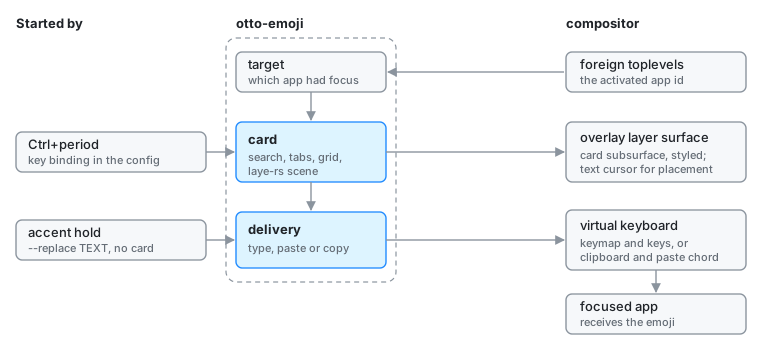
otto-emoji is the emoji picker: a card with a search field, category tabs, a
grid and a footer naming the emoji under the pointer and the skin tone in
use. Picking one closes the card and delivers the emoji to the window that
had the keyboard. It lives in components/otto-emoji/ and sits in the app
layer of architecture.toml. It is a short-lived process with no daemon: the
shipped config starts it on Ctrl+period, and it exits once something is
picked. The compositor also runs it as otto-emoji --replace to type the
accented letter chosen when a key is held (see the
accent hold spec).
Modules
The crate is a binary and a small library. The library holds everything that
needs no screen, so the compositor’s end-to-end test tests/emoji_typing.rs
and the examples can use it.
| Module | What it does |
|---|---|
main.rs | The picker: command line, surfaces, input, the card’s arrival and exit, and delivery of the pick. |
view.rs | The card as a laye-rs scene: query field, tabs, grid, footer, and where the card sits relative to the caret. |
data.rs | The emoji table, baked in from data/emoji.txt, with skin-tone variants folded onto each base emoji. |
search.rs | Word matching of the query against names, subgroups and groups. |
pan.rs | Sideways swipes through the category panes, settling onto one pane. |
recents.rs | Recent picks and the chosen skin tone, in $XDG_STATE_HOME/otto/. |
target.rs | Which app had the keyboard, read from zwlr_foreign_toplevel_manager_v1. |
typing.rs | Typing through zwp_virtual_keyboard_v1, and the paste chord. |
data/emoji.txt is generated from Unicode’s emoji-test.txt by
data/regen.py.
How it runs
Before the card.
target.rsopens its own Wayland connection, lists the toplevels and notes the activated one’s app id, before the picker’s own surface can take focus. The picker also asks otto-kit to watch the text cursor throughotto_text_cursor_v1.The card. One
wlr-layer-shellsurface on the overlay layer, covering the output, with exclusive keyboard interactivity. The card is a subsurface of it. With a caret known, the card is a balloon whose beak points at it; without one, it is centred. Its frost, corner radius and shadow come from the compositor through the surface style protocol, and each category pane scrolls in an otto-kitScrollPane. The card publishes an accessible tree through otto-kit (see Accessibility).Delivery. Once the card is gone, the pick takes one of three routes:
- Type.
typing.rsconnects again, uploads a keymap with one key per codepoint of the emoji and taps them in order. The compositor forwards the keymap and the keys to the window that has the keyboard back. - Paste. The emoji goes on the clipboard and the paste chord is
pressed. With
--auto, the default, this is the route for text outside the Basic Multilingual Plane going to anything but a terminal, because Chromium-based apps drop those keysyms. - Copy (
--copy). The emoji goes on the clipboard and nothing is pressed.
A clipboard offer lives only as long as the client that made it, so after a paste or a copy the process stays, with no surface, until the selection moves on.
- Type.
--insert TEXT and --replace TEXT skip the card and type straight away;
--replace presses Backspace first.
Dependencies
otto-kit for the runner, surfaces, frosting, theme, components, clipboard,
focus, accessibility and i18n. laye-rs and taffy for the scene and its
layout. xkbcommon and memfd build the keymap the virtual keyboard
uploads. wayland-protocols-misc supplies zwp_virtual_keyboard_v1 and
wayland-protocols-wlr the layer shell and foreign toplevel protocols.
Going deeper
- Spec: emoji picker, and
accent hold for
--replace. User guide: Emoji. - Scroll pane, otto-kit, otto-launcher for the card it shares its material with.
- The
previewandtypeexamples, swipe tuning and the table’s regeneration: AGENTS.md.