← Otto Developer Guideotto-canvas
User guide: Side Canvas, Ask and Agents
Specs: Side Canvas
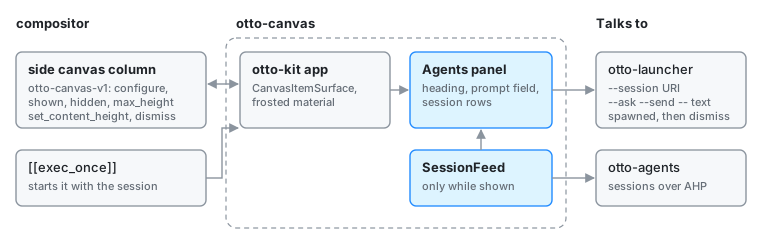
components/otto-canvas/ is the Agents panel in Otto’s side canvas: a prompt
field over the list of otto-agents sessions, in one frosted
item of the column that slides in from the right edge. It is an app in
architecture.toml, and runs as its own process, an otto-kit app started by
the compositor from [[exec_once]] in the shipped config. The compositor owns
the column; otto-canvas is a client that places one item in it through the
otto-canvas-v1 protocol. It does no agent work itself: it hands each request
and each opened session to otto-launcher.
The column, its protocol, height sharing and this panel’s drawing are described in depth on Side canvas; this page is the structural overview.
How it runs
src/main.rs is the whole app, a Sessions value run by otto-kit’s
AppRunner.
- One canvas item. On start it creates a
CanvasItemSurface, tells the column its natural height (set_content_height), asks for the keyboard on show (set_keyboard_interactivity(on_show); on a compositor without that request, a click gives it the keyboard) and applies the frosted material through the surface style protocol. - A connection only while shown. On
shownit starts aSessionFeedfrom otto-agents-kit, which connects to the service on its own thread and lists the sessions again whenever the service announces a change. Onhiddenit drops the feed, so a hidden canvas has no connection, and clears the prompt. - Height. It grows with its rows up to the share of the column the
compositor gives it (
max_height, protocol version 5) and scrolls past that with otto-kit’sScrollView. Without a share it stops at a fixed height. - Handing off. Opening a row asks the session’s opener first, so a
Studio session opens in Studio; otherwise it runs
otto-launcher --session <URI>. Enter with text typed runsotto-launcher --ask --send -- <text>, and with nothing typedotto-launcher --ask. The launcher runs in its own process group and is reaped on a thread, and the panel then sendsdismissso the canvas slides away.
The keys (arrows, Tab, Ctrl+N/P and the page keys to walk the rows, the field editing keys) and the row painting come from otto-agents-kit, so the panel behaves like the launcher’s agents mode.
Dependencies
- Workspace:
otto-agents-kit(session feed, rows, keys, opener) andotto-kit(the app loop,CanvasItemSurface, text input, scrolling, materials). - At run time: the compositor’s
otto-canvas-v1, a running otto-agents for the list, andotto-launcheron$PATH.
Going deeper
- Side canvas and its spec.
- Agents: the service the panel lists.
components/otto-canvas/AGENTS.md: running a development build against a dev compositor.