← Otto Developer Guideotto-bar
User guide: Top Bar
Specs: Top Bar
otto-bar is the strip along the top of the screen: the Otto menu and the
focused app’s menus on the left, and the tray, the keyboard layout, the
battery and the clock on the right. It lives in components/otto-bar/ and
sits in the app layer of architecture.toml, so nothing links it. It runs
as its own process, an otto-kit app started by the compositor from an
exec_once entry in the shipped config. On the session bus it is both a
client of the compositor and the host other apps register their tray icons
and menus with.
Modules
| Module | What it does |
|---|---|
main.rs | Starts logging, picks the language from the desktop, starts the update check and hands TopBarApp to otto-kit’s AppRunner on a two-worker tokio runtime. |
app.rs | The app: creates the surfaces, opens and closes every menu, handles pointer and keyboard input, builds the accessibility tree, and picks up changes from the watchers in on_update. |
bar.rs | Draws the left panel (Otto mark, app name, menus) and the right panel (tray, layout, battery, clock), packed right to left. |
appmenu.rs | The global menu: follows the focused window and serves com.canonical.AppMenu.Registrar. |
dbusmenu.rs | Client for com.canonical.dbusmenu, used by app menus and tray menus. |
tray.rs | Serves org.kde.StatusNotifierWatcher and follows each registered StatusNotifierItem. |
keyboard_layout.rs | The layout indicator and its menu, from GetInputs and InputChanged on org.otto.Shell1. |
power.rs, battery.rs | Battery state from UPower (sysfs when UPower is absent), CPU frequency and governor from sysfs, power profiles; battery.rs draws the glyph. |
clock.rs | The clock, following topbar.show_clock and topbar.clock_format. |
logout.rs | Asks through org.otto.Dialog1, then sends the compositor its logout command. |
update.rs | Asks a version endpoint whether a newer release is out, and adds an entry to the Otto menu when it is. |
config.rs, settings.rs | Read otto-bar.toml; share the value handling for org.otto.Settings. |
How it runs
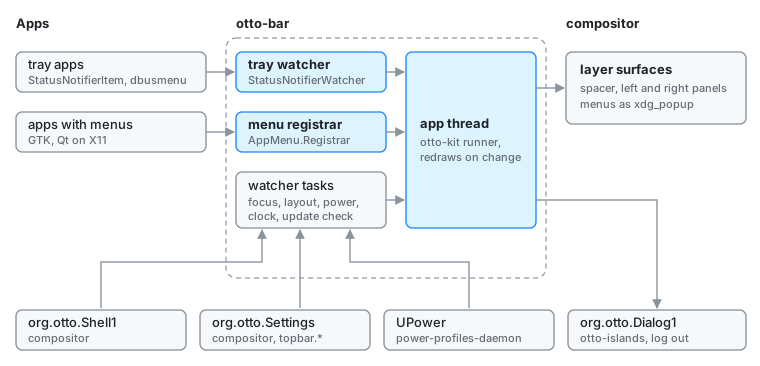
Surfaces. Three wlr-layer-shell surfaces on the top layer. A
one-pixel spacer spans the whole top edge and only reserves the exclusive
zone that pushes maximised windows down. The left and right panels are
corner-anchored and reserve nothing; their material and size animation go
through the surface style protocol. Every menu
is an xdg_popup on one of the panels, built with otto-kit’s ContextMenu.
While a menu is open the panel takes the keyboard exclusively, so the menu
can be driven with the arrow keys.
Threads. Drawing and input run on the otto-kit app thread. Each source of
state (tray, app menu, power, keyboard layout, clock settings, update check)
is a tokio task that writes into a shared static behind a mutex, bumps a
generation counter and wakes the app thread. on_update compares the
counters and redraws or refreshes an open menu only when one moved. A
separate Wayland connection from otto-kit’s focus watcher binds
zwlr_foreign_toplevel_manager_v1 for the focused app’s name.
The global menu. appmenu.rs takes the focused window from
org.otto.Shell1 (GetTree at start, then WindowChanged) and finds its
menu one of three ways: the otto_appmenu entry the compositor records for
Wayland Qt apps that speak org_kde_kwin_appmenu, the X11 window id
registered with the registrar the bar serves (GTK through
appmenu-gtk-module, Qt on xcb), or the process id behind a registration.
With topbar.show_app_menu off the bar releases the registrar name, so apps
keep their menus in their own windows.
Names it owns. org.kde.StatusNotifierWatcher and
com.canonical.AppMenu.Registrar, both requested without allowing
replacement. A second bar on the same bus gets neither.
Names it calls.
org.otto.Shell1: the focused window, the input devices, and commands such as minimise and quit for the app menu. See Shell D-Bus API.org.otto.Settings: thetopbar.*settings, followed throughChanged. See Settings D-Bus API.org.otto.Dialog1on otto-islands, for the log-out question. Without otto-islands the logout goes ahead.- UPower and power-profiles-daemon on the system bus.
- Each tray item’s
StatusNotifierItemandcom.canonical.dbusmenu.
Files. otto-bar.toml from /etc/otto/, ~/.config/otto/ and the
working directory, for the battery and the clock fallback (see the
README). The update check keeps its
counting state in $XDG_STATE_HOME/otto/update-check.
Dependencies
otto-kit for the runner, surfaces, menus, typography, theme, i18n and the
org.otto.* proxies it re-exports from otto-dbus. zbus on
tokio for the bus, ureq for the update check, chrono for the clock. The
colour scheme reaches it through otto-kit, and the panels repaint in
on_theme_changed (see Color Scheme). Both panels
publish an accessible tree through otto-kit once an assistive technology
attaches (see Accessibility).
Going deeper
- Spec: top bar. User guide: Top bar.
- Shell D-Bus API, Settings D-Bus API, otto-islands for the dialog.
- Build, run and test notes: AGENTS.md.