← Otto Developer Guideotto-agents-kit
User guide: Ask and Agents
Specs: Launcher, Dictation, Preview
components/otto-agents-kit/ holds what Otto’s agent interfaces have in
common: the feed of otto-agents sessions and the rows that
show them, the keys that walk a list and edit its field, the Ask chat, and the
log the chat is drawn in. It is a library in the kit layer of
architecture.toml. It has no process of its own: it runs inside each host,
which keeps its own window and field and talks to the service through the kit.
The hosts are otto-launcher (Ask and agents mode),
otto-canvas (the side canvas’s session list) and
otto-preview (Studio’s chat beside a document).
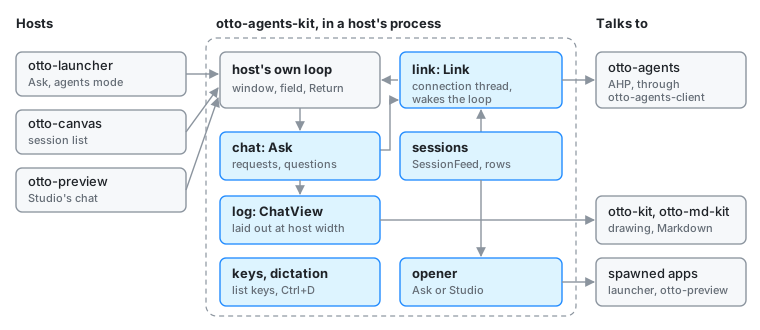
Modules
| Module | What it does |
|---|---|
link | Link, the connection thread. A host’s loop is not async, so Link runs the AHP client on a thread with its own current-thread tokio runtime, sends updates over a channel and wakes the loop through a socket the loop polls (Link::poll_fd) |
sessions | SessionFeed, which lists the agents and sessions and lists them again whenever the service announces a change, until it is dropped; and session_items, which turns sessions into rows (title, agent, activity, folder) |
opener | Where a picked session opens: in Ask, or in Studio beside the file named by otto.app and otto.subject in the session’s _meta |
chat | Ask, the conversation: queueing requests on a session’s chat, attachments and stashed items, permission requests, the agent’s questions (chat::input), modes, and handing a session to its terminal |
log | The chat’s log: laid out at the host’s width (layout), painted a band at a time (paint::LogPainter), selectable (selection), and kept between events by view::ChatView, a ScrollContent the host puts in its own scroll pane |
keys | The keys a field over a list answers to: list_step, wrap, edit_field, copy_to_clipboard. Each host checks its own keys (Enter, Escape) first |
dictation | Ctrl+D dictation into a host’s field. Built only with the dictation feature |
item and rows are re-exports of otto_kit::components::item_list, which
the settings sidebar search uses too.
How a host uses it
The host owns its window, its TextInput field and its main loop. It starts
a SessionFeed or an Ask (each with a Link inside), adds their
poll_fd to the file descriptors its loop waits on, and takes the updates
when the loop wakes. The kit never draws into a scene: the rows and the log
paint onto a Skia canvas the host hands them, so the same code paints into the
launcher’s card, a canvas item and a plain otto-kit window.
| Host | What it takes |
|---|---|
| otto-launcher | chat (whose Ask also lists the sessions for agents mode and picks their opener), log, keys, dictation, rows |
| otto-canvas | sessions, keys, opener, rows; it holds the feed only while the canvas is shown |
| otto-preview | chat, log, keys, dictation; it creates its sessions with otto.app and otto.subject in their _meta |
Ask queues each request on the session’s chat rather than starting a turn,
so a host can close at any moment: the service already owns the request.
Agents walks through that flow.
Dependencies
- Workspace:
otto-kit(drawing, text input, scroll panes, the item list),otto-md-kit(the agent’s Markdown in the log), otto-agents-client (socket, URIs, connection). - External:
ahpandahp-types, pinned with otto-agents-client;tokioon the connection thread;smithay-client-toolkitfor key events. - Feature
dictation: turns onotto-kit/dictation, which brings in the microphone and the speech engine’s client. The launcher and Studio enable it; the canvas does not.
Going deeper
- Agents and Side canvas.
- Specs: dictation, preview app, launcher.
components/otto-agents-kit/AGENTS.md: tests, and the rule thatopenerand Studio’schat.rsstay in step.