← Otto Developer GuideLayers
A layer is the unit Otto draws with. Every window, shadow, menu, dock icon and wallpaper is one or more of them in the lay-rs scene. This page is about that unit: what it holds, what happens to it on a frame, and the few ideas that make the rest of the code read as obvious. For the shape of the tree the layers form, see The Scene Graph.
Anatomy
A layer is the unit; The Scene Graph is the tree they form, and its overview diagram shows how whole subtrees of them become hardware planes.
A Layer value is a handle, not the thing itself: an Arc<Engine>, a
NodeRef into the scene arena, a Taffy node id, and an Arc<ModelLayer>.
Cloning one is free and clones nothing: two Layers with the same id are
the same layer. That is why Otto passes them into 'static closures and
stores them in half a dozen structs without a second thought, and also why a
stale handle to a removed layer is a real hazard (Engine::is_layer_alive
exists for exactly that).
The ModelLayer behind the handle is a flat bag of properties
(lay-rs/src/layers/layer/model.rs):
| Group | Properties |
|---|---|
| Geometry | position, size, anchor_point, scale, rotation, display |
| Paint | background_color, border_color, border_width, border_corner_radius, shadow_offset, shadow_radius, shadow_spread, shadow_color, shape |
| Composition | opacity, blend_mode, image_filter, color_filter, clip_content, clip_children |
| Content | draw_content, a closure that paints into a Skia canvas |
| Identity | key, pointer_events |
The right mental model is Core Animation’s CALayer. A layer does not know
what it represents. It has no concept of “window” or “button”; it knows where
it is, how it looks, and how to paint itself. All the meaning lives in Otto, in
WindowView, DockView and WindowSelectorView, and those types are just
code that edits layers.
One consequence is worth stating early, because it explains a lot of Otto’s
structure: a layer with no drawables is free. No background, no border, no
shadow, no content closure, normal blend mode, no clipping. lay-rs calls that
a layout-only passthrough and skips both repaint and its own geometry damage
(RenderLayer::is_layout_only_passthrough). Container layers such as
workspaces_layer or a window’s content_layer cost a transform and nothing
else, so Otto uses them freely to give subtrees something to move as a unit.
Two faces: the model and the render layer
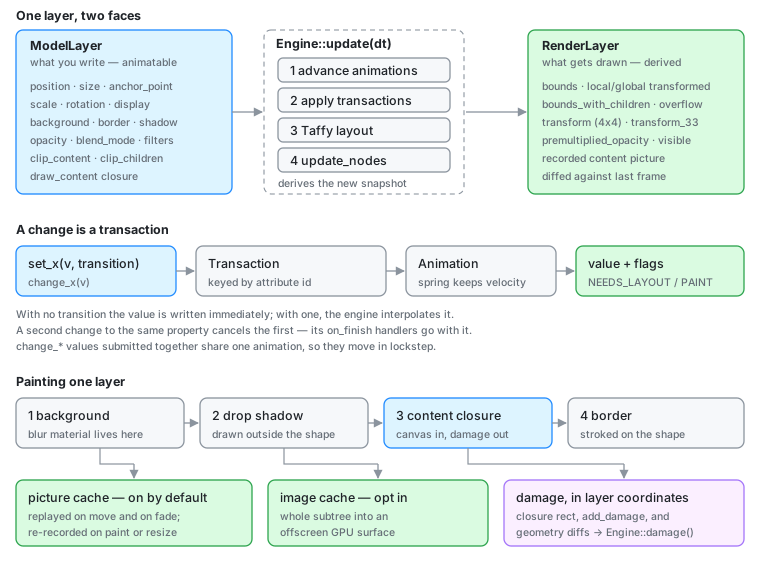
Every layer exists twice, and keeping the two apart is the single most useful distinction on this page.
ModelLayer is what you write. It is the declared intent: “position is
(120, 40)”, “opacity is 0.4”. Its values are Attribute<V> cells: thread-safe,
cheap to read, each with a process-unique id.
RenderLayer is what gets drawn. It is derived, once per frame, by the
engine from the model plus Taffy’s layout result plus the parent’s state
(update_with_model_and_layout). It holds resolved things the model never
mentions: bounds, local_transformed_bounds,
global_transformed_bounds_with_children, a 4×4 transform relative to the
root, premultiplied_opacity (this layer’s opacity times every ancestor’s), and
visible.
The seam between them is where several recurring confusions live:
- Position is layout plus offset.
RenderLayerposition istaffy_layout.location + model.position. Almost every layer Otto creates setsposition: taffy::Position::Absolute, which pins the layout location at the parent’s origin and leavesset_positionin full control. Layers that do use flexbox (inside otto-kit views, the dock’s icon row) get their location from Taffy and treatpositionas a nudge. - Reading back a property is not reading the screen.
layer.position()returns the model value, which mid-animation is the target, not the current one.layer.render_position(),render_bounds_transformed()and friends read the render layer, which is what the user can see. - Opacity composes, size does not. A parent at 0.5 opacity halves its
children through
premultiplied_opacity; a parent’s size does not constrain a child unlessclip_childrenis set.
Retained, not immediate
Otto never draws a window. It sets a property on a layer, and the layer remembers. That is the retained-mode bargain, and it is chosen deliberately:
- The engine knows what changed, so the compositor does not have to. In an
immediate-mode design the caller must track dirty regions, because only the
caller knows what it is about to draw differently. Here,
update_nodescompares each node’s previousRenderLayersnapshot against the fresh one and derives the damage itself. That is what makes “an idle desktop renders nothing” a property of the architecture rather than a discipline every call site has to observe. - State survives the frame, so animation is cheap. A move is a change to one number over time. Nothing re-describes the window each frame; the tree is already correct apart from that number.
- The scene outlives the client’s paint. A window’s layer keeps its geometry, shadow and decoration while the client is between buffers, mid resize, or not painting at all.
The price is real and shows up throughout Otto: there is a second copy
of the truth, and it has to be kept in sync with the Wayland state without
inventing work. Writers into the scene are unconditional (set_position
schedules a change without comparing the old value), so every path that
mirrors surface state into layers has to be idempotent by hand. See the damage
section of Render Loop for how configure_surface_layer
hashes its inputs to avoid exactly that.
A change is a transaction
Setting a property does not mutate it in place. It builds a ModelChange
holding the old value, the new value and the RenderableFlags the change
implies (NEEDS_LAYOUT, NEEDS_PAINT), then schedules it on the engine:
layer.set_position(Point { x, y }, None);                       // applies now
layer.set_position(Point { x, y }, Some(Transition::ease_out(0.3)));  // animates
With no transition the model value is written immediately and the change is
still scheduled, so the flags reach the node. With a transition, the model
keeps its old value and an Animation interpolates from from to to across
subsequent Engine::update(dt) calls. Animation is therefore a property of
the change, not of a loop. Nothing in Otto ticks a counter to move a window;
it states the destination and the feel.
Three details follow from how transactions are stored, and all three have bitten this codebase:
One in-flight transaction per property. schedule_change keys transactions
by the attribute’s id and cancels any existing one for that value. A second
set_position replaces the first, along with its on_finish handler, which
is simply dropped. src/shell/xdg.rs carries a comment explaining that the
fullscreen un-park deliberately hangs off the size animation rather than the
position transaction, because a client commit repositioning the window
mid-flight would otherwise strand it in the overlay plane forever.
Springs inherit velocity. When a spring change lands on a property that
already has a running spring, the macro in lay-rs/src/engine/command.rs
samples the current velocity and seeds the new spring with it. Interrupting a
workspace swipe or a dock magnification feels continuous for free — no
special-casing at the call site.
Changes can be grouped. layer.change_position(p) returns an unscheduled
AnimatedNodeChange; a batch of them submitted through
Engine::add_animated_changes(&changes, animation) shares one animation and
therefore moves in lockstep. That is the mechanism behind
otto-surface-style-unstable-v1’s transactions: the handlers in
src/surface_style/handlers/ accumulate change_* values while a client
transaction is open and submit them together on commit
(Surface Style Protocol).
Callbacks hang off either end: on_start / on_update / on_finish on a
transaction, on_animation_* on an animation. Otto drives the xdg-shell
configure sequence of a fullscreen transition from an on_animation_update
handler. The client is being resized by the same curve that moves the layer.
How a layer gets its content
A layer paints itself in a fixed order (lay-rs/src/drawing/layer.rs):
- Background: the shape filled with
background_color. UnderBlendMode::BackgroundBlurthis is drawn with Skia’sLuminosityblend over the blurred backdrop, plus a faint noise image; that is the whole “frosted glass” material. - Drop shadow: drawn outside the shape (
ClipOp::Difference), which is why a leaked clip anywhere above erases it. - Content: the draw closure, or the picture recorded from it.
- Border: stroked on the shape.
The closure is the interesting part:
Fn(&skia_safe::Canvas, f32, f32) -> skia_safe::Rect
Width and height come in; a damage rect in the layer’s own coordinates goes
out. That return value is not decoration — it is how content that the engine
cannot reason about reports what changed. A closure is also free to paint
outside the layer’s bounds, and the engine records where it actually painted in
RenderLayer::content_overflow so the ink outside the box still gets
repainted.
Otto uses this in two distinct ways.
Compositor-drawn content (dock icons, the titlebar, the window shadow) is Skia drawing straight into the canvas, usually produced by a view (below).
Wayland surfaces get a closure too, and notably not an image. On commit,
configure_surface_layer (src/workspaces/utils/mod.rs) installs a closure
that looks the client’s texture up by id at paint time:
layer.set_draw_content(move |canvas, w, h| {
    let tex = crate::textures_storage::get(&draw_wvs.id)?;
    // …place per contents-gravity, convert buffer damage to layer coords…
    canvas.draw_image_rect_with_sampling_options(…);
    damage
});
The indirection buys two things. The renderer imports buffers into
textures_storage on its own schedule while the scene holds only an id, so
re-installing the closure every commit does not invalidate the layer’s cached
picture. And the closure is the one place that knows the mapping from buffer
pixels to layer coordinates (buffer scale, the viewport crop, the contents
gravity), so it is the only place that can convert the client’s buffer damage
into a rect the engine can use.
When the damage source is outside the closure entirely, Layer::add_damage(rect)
and set_damage(rect) hand the engine a layer-local rect directly. They are
also what mark a layer’s followers for repaint.
Composition: what a parent does
Children are painted in child order: z-order is tree order, and
add_sublayer / prepend_sublayer are how Otto restacks. Beyond order, a
parent contributes exactly four things to its descendants:
- Transform. Position, scale and rotation compose down the tree, around
each layer’s own
anchor_point(expressed in unit coordinates, so(0.5, 0.5)is the centre regardless of size). - Opacity. Multiplied into
premultiplied_opacity. - Clipping.
clip_childrenbounds descendants to the parent’s shape;clip_contentbounds only the layer’s own draw closure. - Layout. Taffy runs over the same tree; a flex parent positions children
that have not opted out with
Position::Absolute.
set_hidden(true) is the blunt instrument, and it is not just a visibility
flag: it sets Taffy display: none so the subtree stops participating in
layout, and it invalidates the engine’s hit-test and traversal caches. A
subtree parked hidden costs nothing, which is how Otto keeps every workspace’s
windows in the tree at once.
Caching: the picture and the image
Two caches sit on every node, and they are not alternatives to each other.
Picture cache (picture_cached, on by default) records the layer’s
drawing into a Skia Picture (a display list) and replays it. do_repaint
re-records only when the node is flagged NEEDS_PAINT, when its size
changed, or when there is no cache yet. Deliberately not on a move, a
parent transform change, or an opacity change: the picture is recorded in the
layer’s local space and opacity is applied by the replay paint, so a translate
or a fade costs a replay rather than a re-rasterisation. Sliding a workspace
full of windows re-runs no draw closure at all.
set_picture_cached(false) is therefore an opt-out, and Otto reaches for it
where a layer’s content is a live re-render of something else (exposé mirrors,
the workspace-selector background, the XWayland mirror), because there the
cache would freeze a moving image.
Image cache (image_cached, off by default) rasterises a whole subtree
into an offscreen GPU surface and composites the result. It is the right answer
for expensive but static drawing: the window shadow and dock app icons use it.
It is the wrong answer for anything that should show a live backdrop blur from
below, because the subtree is composited from its own buffer.
content_opaque is a third, unrelated flag: a promise that the draw
closure fills the layer’s bounds with opaque pixels. Occlusion culling
(RenderLayer::is_fully_opaque) treats a layer as an occluder only when its
premultiplied opacity is 1, the blend mode is Normal, the shape is a
RoundRect with every corner radius at 0, and the bounds are filled, either
by an opaque background_color or by this flag. That is why client surface
layers and the wallpaper set it explicitly: they paint through a closure, so
nothing else can tell.
Getting these wrong is the usual reason something is stale or slow, and all three are visible per-node in the scene debugger.
Damage is something a layer reports
Damage in lay-rs is derived, not declared. For each node, update_node_single
compares the previous RenderLayer snapshot with the fresh one and unions
rectangles for what moved, resized, faded, appeared or disappeared; content
damage comes from the draw closure’s return value (or a pending
add_damage rect) mapped into global coordinates by the node’s transform. If
nothing changed, the node returns an empty rect and the engine short-circuits.
Two behaviours are worth internalising:
- A content-only repaint stays small. When a draw cache already exists and the closure returned a non-empty rect, the engine damages just that rect instead of the whole layer. A closure that returns full bounds out of caution throws that away.
- Translucency inverts the usual reasoning. A
BackgroundBlurlayer’s damage is outset by the blur sigma, and its backdrop has to be re-rendered when what is behind it changes. That coupling is what Render Loop calls backdrop regions.
The per-frame union is Engine::damage(); Engine::subtree_damage(root)
answers the same question for one subtree, which is how the KMS plane path
decides whether a plane needs re-rendering at all
(DRM Planes).
Followers: one layer’s content, elsewhere
layer.as_content() turns a layer into a draw closure that re-renders that
layer’s whole subtree wherever it is installed, and
leader.add_follower_node(&follower) records the link so the leader’s repaints
mark the follower. Together they are lay-rs’s mirroring primitive: exposé
previews, the XWayland mirror, and the wallpaper reused as the exposé backdrop
are all follower layers pointing at a live subtree.
The mirror is a rendering of the source, not a reference to it, so it can sit
anywhere in the tree at any size with its own transform, and the source keeps
being the only real copy. Two sharp edges come with that: as_content guards
against recursion with a thread-local set (a follower may be a descendant of
its leader), and repaint marking propagates from the leader node itself, never
from its descendants, so a client commit deep inside a window’s surface tree
does not mark the mirror. Exposé documents how Otto works around
the second.
Views: state in, layer tree out
For anything more structured than a single node, Otto uses a lay-rs View: a
hashable model plus a render function returning a LayerTree, mounted on a
layer.
let view = View::new("window_shadow", model, Box::new(view_window_shadow));
view.mount_layer(shadow_layer.clone());
view.update_state(&new_model);   // hashes the model; no-op when unchanged
update_state hashes the state and returns without touching the tree when the
hash matches. That is load-bearing, not an optimisation: update_decoration
runs on every commit of a decorated window, and re-rendering unconditionally
would rebuild the titlebar’s layers at the client’s frame rate. The workspace
selector, window selector, background and context menus are all views; the
dock is not, and DockView drives its layers directly.
Pitfalls
set_*returns aTransactionRefand cancels the previous one for that property. Anything hanging off the old transaction’s callbacks is gone.- A property getter is the model value, not the rendered one. Mid-animation
they differ; use the
render_*accessors when you mean the screen. - Re-installing a draw closure does not invalidate the picture cache, and
neither does changing something the closure closes over. If content changed
without a property changing, say so:
add_damage,set_damageorredraw(). - An empty recording is not a cache hit. lay-rs deliberately falls back to the closure when a recorded picture has zero ops, because a picture recorded while a layer had nothing to give would otherwise lock it blank forever.
- Layer positions are physical pixels.
output_geometry()is logical; see the conventions in the developer guide index. TypedPhysicalPoint/PhysicalSizevalues reach lay-rs throughutils::geometry::layer_point/layer_size.
Where to look
| Concern | File |
|---|---|
| The layer handle and its API | lay-rs/src/layers/layer/mod.rs |
| Property bag | lay-rs/src/layers/layer/model.rs |
| Resolved per-frame state | lay-rs/src/layers/layer/render_layer.rs |
Changes, transactions, the change_model! macro | lay-rs/src/engine/command.rs |
| Per-node update, repaint and damage | lay-rs/src/engine/stages/update_node.rs |
| Paint order for one layer | lay-rs/src/drawing/layer.rs |
| Tree traversal, caches, blur | lay-rs/src/drawing/scene.rs |
| Surface layer configuration and the draw closure | src/workspaces/utils/mod.rs |
| Per-window layers | src/workspaces/window_view/view.rs |
| Client-facing layer properties | src/surface_style/ |
Related: The Scene Graph · Rendering · Render Loop · DRM Planes · Exposé