← Otto Developer GuideDock
The dock is Otto’s task manager: running applications, bookmarked launchers, and minimized windows, on one screen edge.
It is drawn by the compositor, not by a client. That is unusual, since the top bar, the launcher and the islands are all separate Wayland clients, and it is a deliberate trade. The dock is the target of the genie minimize animation, so it and the window being minimized have to be nodes in the same scene graph. A client-side dock would mean animating a window into a surface the compositor cannot see inside.
The consequence to keep in mind while working on it: the dock has no window,
no surface, and no event loop of its own. It is a set of lay-rs layers plus
an observer, living inside the compositor’s state.
Data flow
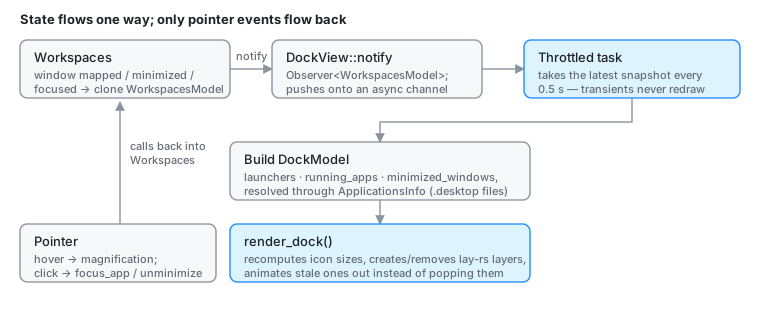
Workspaces is the observable owner of global window state. When the layout
changes, or a window is minimized or restored, it clones WorkspacesModel and
notifies its observers (src/workspaces/mod.rs). DockView registers as one
at startup.
DockView::notify does not rebuild the dock. It pushes the snapshot onto
an async channel, and a throttled task in notification_handler takes the
latest snapshot every 0.5 s and turns it into dock state
(src/workspaces/dock/view.rs). Window state churns constantly (focus,
geometry, title) and rebuilding icon layout on every event would be pure
waste.
When a snapshot is taken, the dock resolves Application metadata via
ApplicationsInfo::get_app_info_by_id, builds a DockModel, and calls
update_state, which calls render_dock().
DockModel (src/workspaces/dock/model.rs) is small on purpose:
pub struct DockModel {
    pub launchers: Vec<Application>,               // bookmarks
    pub places: Vec<Application>,                  // the strip past the divider
    pub running_apps: Vec<Application>,
    pub minimized_windows: Vec<(ObjectId, String)>,
    pub width: i32,
    pub focus: f32,                                // magnification focus
}
Application metadata
Icons and names come from .desktop files in the standard locations, per the
Desktop Entry Specification.
That lookup touches the filesystem and an icon theme, so it happens off the
main thread: ApplicationsInfo (src/workspaces/apps_info.rs) resolves
asynchronously and the dock renders with a placeholder until the result
arrives. Blocking the compositor’s loop on icon lookup would stall every client
on the system.
The lookup is built on xdgkit, freedesktop-icons and
freedesktop-desktop-entry.
Layers and layout
The hierarchy is created in DockView::new (src/workspaces/dock/view.rs):
wrap_layerpins the dock to its screen edgeview_layerholds the childrenbar_layeris the frosted backgrounddock_apps_containerholds running apps and bookmarksresize_handle: drag to resize; right-click for the dock’s context menudock_places_containeris the strip past the divider (the Trash)dock_windows_containerholds minimized window thumbnails
render_elements_layers computes the available icon width from the current
dock width, applies size changes, and installs pointer callbacks on the
per-app layers. Layers for apps that went away fade and scale out before being
removed, so the remaining icons slide rather than jump.
magnify_elements is the hover magnification: it reads the current
pointer focus position, computes a Gaussian falloff (magnify_function), and
schedules the resulting size changes through Engine::schedule_changes.
Interactions
Pointer handling lives in the ViewInteractions impl for DockView
(src/workspaces/dock/interactions.rs):
- Motion updates the magnification focus. Leaving the dock resets it to a sentinel value so the icons shrink back.
- Button release looks up the layer under the pointer. An app layer calls
Otto::focus_app(src/state/app_management.rs), which raises the window and hands it keyboard focus, or launches the bookmark when nothing is running; a minimized-window layer callsWorkspaces::unminimize_window. - Right-click on the handle opens the dock’s context menu (position,
autohide, magnification), which writes back through
set_dock_setting.
Hit-testing is routed ahead of windows: Otto::surface_under defers to
Workspaces::is_cursor_over_dock (src/input/pointer.rs,
src/workspaces/mod.rs), so the dock claims pointer focus before any window
underneath it.
Minimize and restore
Workspaces::minimize_windowappends(ObjectId, title)toWorkspacesModel.minimized_windows, updates dock state, and animates theWindowViewinto the dock’s window drawer.Workspaces::unminimize_windowremoves the entry, runs the genie animation back into the workspace, and collapses the drawer.DockView::add_window_element/remove_window_elementare the bridge between dock layers and window views during those animations.
Rendering
src/workspaces/dock/render.rs holds the Skia drawing:
draw_app_iconpaints the cached freedesktop icon with a drop shadow. Without an icon it falls back to a stroked rounded rect. It does not draw the running-app indicator dot — that is a separate layer.- Labels are balloons with blurred shadows, hidden until hover. The
balloon body is
theme_colors().material_tooltipand the texttext_primary, so both follow the light/dark palette. - The bar uses background blur and colours from
theme_colors()(otto-kit’s palette), and resizes with the icon height.
The dock draws on its output’s overlay plane, with the rest of the chrome,
rather than on a plane of its own; see DRM Planes. A KMS
plane costs the full pixel rate whatever its size, and on i915 at
2880x1920@120 that admits four planes, so a dock plane would take a client’s
(Workspaces::new_output_workspaces). The blur backdrop behind the bar tracks
the bar’s own frosted shapes, not the whole plane: a window repainting
elsewhere on the overlay plane does not rebuild it.
Configuration
Under [dock] in otto_config.toml:
[dock]
size = 1.0              # multiplier, 0.5 – 2.0
position = "bottom"     # "bottom", "left", "right"
autohide = false
magnification = true
genie_scale = 0.5       # magnification amount
genie_span = 10.0       # magnification falloff (larger = tighter)
colorize_icons = false  # tint icons to colorize_color

bookmarks = [
  { desktop_id = "org.gnome.Nautilus.desktop" },
  { desktop_id = "org.mozilla.firefox.desktop", label = "Web", exec_args = ["--private-window"] },
]
Bookmarks are preloaded into the dock and behave like running apps on hover. Clicking one focuses an existing instance, or launches the desktop entry if nothing is running.
size, position, autohide and magnification are live settings.
Changing them through org.otto.Settings reconfigures the dock in place, no
restart. See settings-dbus-api.md.
Open question: dock submenus
Per-app submenus (recent documents, app-provided actions) would need information the compositor does not have. Two directions were considered:
- A Wayland protocol for an app to publish its dock items. This is what
otto-dock-v1(src/otto_dock/,protocols/otto-dock-v1.xml) is for. It carries badges and progress bars today, not submenus. - A separate application that owns the submenu UI and talks to the dock.
Related: a protocol for icon and name would also be more efficient than reading
.desktop files, and would work for apps that ship no desktop entry at all.