← Otto Developer GuideOtto Components
Otto is one Cargo workspace. The compositor is the root crate; everything
else is a library or a program in components/, crates/ or tools/. Each
crate has a page here that explains how it is built, with a diagram, and a
folder with an AGENTS.md holding the working notes: dependencies, how to
build, run and test it, and its rules.
Every crate belongs to one layer of architecture.toml,
and a layer may only use the layers it names. cargo run -p otto-arch checks
this in CI; Architecture Rules explains the rules and draws
the full dependency graph.
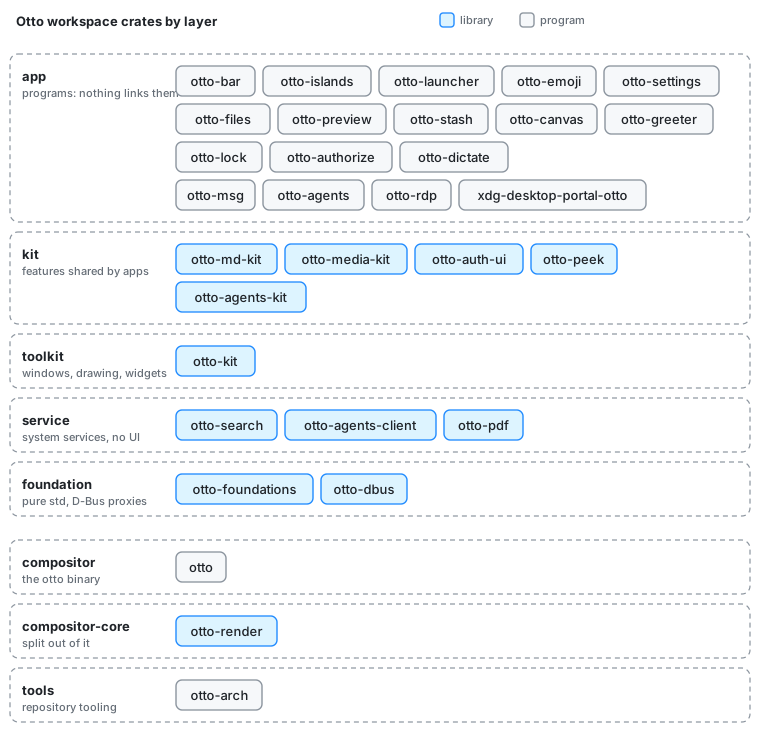
Programs
The app layer: Wayland clients, daemons and the portal backend. Nothing depends on an app.
| Crate | What it is |
|---|---|
| otto-bar | The top menu bar: global app menu, tray, keyboard layout, battery and clock |
| otto-islands | The dynamic island, the session’s notification daemon and the system dialog |
| otto-launcher | The keyboard launcher, with Ask and the agents mode |
| otto-emoji | The emoji picker: search or browse, and the pick is typed where the cursor was |
| otto-settings | The Settings app |
| otto-files | The file browser, file picker and desk |
| otto-preview | Studio: one file in a window of its own, with an agent chat and PDF editing |
| otto-stash | The card that collects selections, files and screen regions to hand to Ask |
| otto-canvas | The Agents panel in the side canvas |
| otto-greeter | The login screen, backed by greetd |
| otto-lock | The screen locker: holds the ext-session-lock-v1 lock and checks PAM |
| otto-authorize | The polkit authentication agent: the password panel for pkexec, system services and protected settings |
| otto-dictate | A proof of concept: dictation as a Wayland input method |
| otto-msg | The command-line client of org.otto.Shell1: commands, the tree as JSON, events; bug reports with otto-msg doctor |
| otto-agents | The agent service: runs ACP agents and serves them over the Agent Host Protocol |
| otto-rdp | The RDP bridge that serves an output and forwards remote input |
| xdg-desktop-portal-otto | The xdg-desktop-portal backend: screen sharing, settings, dialogs, screenshots and file chooser |
Libraries
From the top of the stack down. A kit may use the toolkit, the services and the foundation; the toolkit and the services use only the foundation; the foundation uses nothing in the workspace.
| Layer | Crate | What it is |
|---|---|---|
| kit | otto-md-kit | The Markdown parser, producing the toolkit’s document blocks |
| kit | otto-media-kit | Video playback: a Player and view, GStreamer in a sandboxed worker |
| kit | otto-auth-ui | The password panel shared by the greeter, the lock screen and the polkit agent |
| kit | otto-peek | Peek, the Space-bar preview, with a sandboxed decode worker |
| kit | otto-agents-kit | The session feed, Ask chat, log and keys shared by the agent UIs |
| toolkit | otto-kit | The toolkit every app is built on, and the drawing half of the compositor’s chrome. Its widgets, pictured: otto-kit library |
| service | otto-search | File search: one query language over LocalSearch, as a library and a command |
| service | otto-agents-client | The wire between otto-agents and its clients: socket, session and file URIs |
| service | otto-pdf | Editing PDFs in place through a runtime-loaded PDFium |
| foundation | otto-foundations | XDG directories, file:// URIs and name matching, over std alone |
| foundation | otto-dbus | Typed client proxies for Otto’s own org.otto.* D-Bus interfaces |
The compositor and the tooling
| Layer | Crate | What it is |
|---|---|---|
| compositor | otto (the root crate) | The compositor. It may use the toolkit to draw its own chrome, but no kit or app. Start at Project Structure |
| compositor-core | otto-render | The render stack: the Skia renderer, its GL and Vulkan plumbing, and the scene render elements |
| tools | otto-arch | The checker for architecture.toml, and the affected-crate selection CI runs on |
Adding a crate
A new crate goes into one layer of architecture.toml, gets an AGENTS.md,
and takes its version from the workspace (see Versioning).
Give it a page here too: a docs/developer/<crate>.md with a diagram in
diagrams/, a row in the tables above, and an entry in
website/build-docs.sh so the site publishes it.