← Otto User GuideOtto Developer Guide
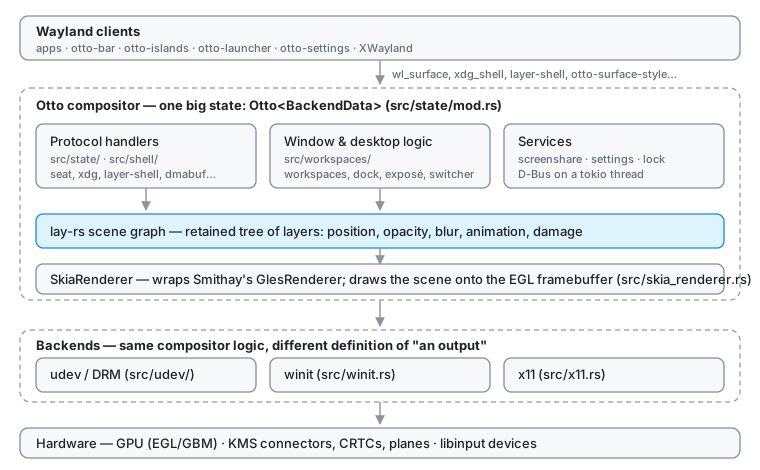
Otto is a Wayland compositor built on Smithay, rendered with Skia, and driven by a retained scene graph (lay-rs).
If you have written a compositor before, the one structural surprise is that
Otto does not draw windows imperatively each frame. It maintains a scene
graph, a tree of layers with positions, opacity, blur and animations, and
hands the whole tree to the renderer as a single render element. Most of
src/workspaces/ is code that mutates that tree; almost none of it draws.
For what Otto does rather than how, see the User Guide. Contributions of every size are welcome, from a bug report to a feature: the issue tracker is the place to start.
Read these first
| Page | What it covers |
|---|---|
| Project Structure | Where everything lives, feature flags, how to build |
| Architecture Rules | Crate layers and module boundaries, and how CI checks them |
| Rendering | Scene graph → render elements → Skia → screen |
| Render Loop | When Otto wakes up, when it renders, damage tracking |
| Wayland Protocols | Every protocol Otto serves, xdg_* included, with version, availability and handler, and how dispatch is wired |
| XDG Specifications | The freedesktop/XDG file and D-Bus standards and system services Otto uses, and where |
| Text Rendering | How Otto rasterises its own text, per-output subpixel layout, and the font settings it publishes to GTK, Qt and X11 |
| The Scene Graph | The layer tree: how it is shaped, how surfaces enter it, how subtrees become KMS planes |
| Layers | The unit the tree is made of: properties, content closures, transactions, caching, damage |
| Components | Every workspace crate by layer, each with a page and an architecture diagram |
Subsystems
| Page | What it covers |
|---|---|
| otto-kit | The toolkit the apps and the compositor’s own chrome are built on |
| The Render Stack | The render stack as a crate: what it owns, what it may not know, how the compositor drives it |
| Scroll Panes | Scrolling an otto-kit app at display rate by moving subsurfaces, not repainting |
| Dock | The compositor-drawn dock: data flow, layers, magnification |
| Exposé | The all-windows overview: layout, mirrors, drag-and-drop, multi-output |
| Window Move | How interactive window drags are implemented |
| Vulkan Renderer | Skia on Vulkan: picking it, buffer import, sync files, what is missing |
| DRM Planes | Handing parts of the scene to display hardware instead of the GPU |
| Foreign Toplevel | Exposing the window list to taskbars and launchers |
| Surface Style Protocol | otto-surface-style-unstable-v1: letting a client style and animate its own surface |
| Screen Sharing | Portal, PipeWire, wlr-screencopy, window capture |
| Permissions | What Flatpak apps cannot reach, the lock screen, and the polkit auth panel |
| File Previews | Thumbnails, the preview column, Peek, the sandboxed decode worker, video |
| otto-media-kit | Video playback: the embeddable player and its GStreamer worker |
| Files | The file browser, picker and desk: one process, a window per folder |
| File Icons | What goes in the icon box: file types, the icon-name chain, themes, animated previews |
| Text in Pictures | Reading the words in a picture: the recogniser, the word cache, selection and copy |
| File Search | Find and Recent in otto-files, and the one index both of them ask |
| Agents | Running coding agents behind the launcher: otto-agents, AHP and ACP, permission prompts |
| The Launcher | Apps, windows, Ask and the agents mode behind one search field |
| The Dynamic Island | Notifications, live activities and the system dialog |
| The Portal Backend | How sandboxed apps reach screen sharing, screenshots, files and settings |
| Accessibility | Key grabs for screen readers, and the shell and kit apps on AT-SPI |
| Color Scheme | How apps learn whether Otto is in light or dark mode and the accent colour, and every Settings portal namespace |
| Settings D-Bus API | The org.otto.Settings wire contract |
| Shell D-Bus API | The org.otto.Shell1 wire contract: i3-syntax commands, the tree as JSON, otto-msg |
| otto-dbus | The one client proxy per org.otto.* interface, and where a new one goes |
| otto-foundations | The UI-free base: XDG directories, user-dirs.dirs, file:// URIs and name matching |
| RDP Bridge | Serving a virtual output over RDP (otto-rdp) |
| Debug Action Hook | Driving builtin shortcut actions from a script ($OTTO_ACTION_FILE) |
| Versioning & Releases | One workspace version for the compositor and every component, and how to bump it |
| Remote-Desktop Indicator | The sharing indicator otto-rdp publishes while a client is watching |
Components
Every workspace crate has a page of its own, with a diagram of how it is
built. Components lists them all by layer, from the apps
down to the foundation, and links each one. A crate’s folder holds its
AGENTS.md, with the working notes: dependencies, how to build, run and test
it, and its rules.
Design docs and plans
These describe work that is exploratory, partial, or superseded. Each says so at the top — check that before trusting the details.
| Page | Status |
|---|---|
| otto-kit Roadmap | Partially built: gap analysis for the UI toolkit |
| Tiling Plan | Mostly built: the tree, the commands and the settings; tabbed/stacked and XWayland are not |
| Screenshot Portal Plan | Partly built: the portal exists and shells out to grim; capture inside the compositor is still the plan |
| AirPlay Screenshare | Exploration only |
| Search Next Plan | Draft requirements, not built |
| Vulkan Renderer Plan | Phases 1–3 built; plane scanout on Vulkan is next |
Specs
docs/developer/ explains how things work today. specs/
holds the behavioural contracts: what a feature must do, written to be
verified against. Where a subsystem has both, the spec is authoritative for
behaviour and the doc is authoritative for structure. See
specs/README.md.
Conventions
Two coordinate spaces, and mixing them causes scale-dependent bugs.
- Physical pixels: raw hardware pixels. Used for layer positions
(
set_position,change_position) andoutput.current_mode().size. - Logical pixels (points): physical ÷ scale.
output_geometry(output).sizereturns these, so it must not be used for layer positions.
Always take the scale from the output itself —
output.current_scale().fractional_scale() as f32. WorkspacesModel.scale is
a global fallback and does not belong in geometry code.
Prefer typed geometry: Smithay’s Point, Size and Rectangle carry the
space in their type (Physical or Logical), so mixing the two fails to
compile. Convert between them only at the edges — to_physical(scale) /
to_logical(scale) with the output’s own scale — and hand lay-rs its plain
floats through the helpers in src/utils/geometry.rs:
| Helper | From | To |
|---|---|---|
PhysicalPoint, PhysicalSize | — | Point/Size<f32, Physical>, the scene’s precision |
layer_point | PhysicalPoint | layers::types::Point (set_position, hover_layer) |
layer_size | PhysicalSize | fixed taffy layers::types::Size |
layer_origin, layer_center | a Layer’s render bounds | PhysicalPoint |
layer_contains | Layer + PhysicalPoint | inclusive hit test |
output_local_physical | global Point<f64, Logical> + output origin + scale | output-local PhysicalPoint |
The workspace selector (src/workspaces/workspace_selector.rs) is converted;
the rest of the compositor is being moved over in slices. Where a value is
still a bare f32/i32, suffix physical-pixel variables with _px
(width_px, offset_px) so the space is visible at the call site. A
genuinely one-dimensional length (a gap, a label height) may stay a scalar.