← Otto User GuideDesktop Widgets
Clocks, system monitors and dashboards that sit on the desktop behind your
windows, using the wlr-layer-shell protocol Otto implements. Otto ships a
few full-screen widgets of its own that you pick in Settings; the rest of this
page walks through setting up eww on Otto,
from installing it to a complete working configuration you can copy.
Otto’s widgets
Settings ▸ Appearance ▸ Desktop ▸ Background widget puts a full-screen page over the wallpaper, behind the desk and the windows:
| Widget | What it shows |
|---|---|
| Calendar | The month in large type, today’s date, and every day of the month by week, today in bold |
| Cross pad | A grid of small crosses with a title, the date up the left edge and a short note |
| Grid pad | A drafting grid with rulers and a diagonal, a title, the date and a short note |
The change applies at once, and the widget comes back when you log in. Choose None to take it away.
They are drawn by ewwii, a GTK4 widget engine that Otto uses when it is installed but doesn’t need. Without it the menu is dimmed and says so. On Arch it comes from the AUR:
yay -S ewwii # or: paru -S ewwii
The widgets also use Python for their scripts and Libertinus Serif
(otf-libertinus) for their titles. Otto starts and stops ewwii itself, on
its own copy of the widgets, so it never gets in the way of an ewwii or eww
setup of yours.
The setting is widget under [desktop] in the config file:
[desktop]
widget = "calendar"   # or "cross_pad", "grid_pad", "none"
Changing them
The widgets are an ordinary ewwii configuration in
/usr/share/otto/widgets/ewwii. To change one, copy the folder to
~/.config/otto/widgets/ewwii and edit it there; Otto uses your copy from then
on. Choose the widget again, or log in again, to see an edit.
Otto doesn’t run your copy in place. Each time a widget starts it copies the
folder to ~/.cache/otto/widgets/ewwii, runs every script in its
generators/ folder with the width and height of the usable area (the screen
less the top bar, the dock and any other panel, in logical pixels), and puts
what they print, SCSS variables, ahead of ewwii.scss, along with
$theme-dir, the copy’s absolute file:// URL. That’s how the grids fit
your screen: GTK only loads a background image from an absolute URL. Every window
you add to your copy is listed in the Settings menu after Otto’s own, named
after the window: Window "my_clock" shows as “My clock”.
The widgets keep clear of the top bar and the dock. Otto writes the space they
take, measured from the widget window’s edges, to a reserved-area file in
the copy as a CSS padding shorthand such as 0px 0px 108px 0px (top first,
then clockwise), and rewrites it whenever a panel or the dock moves. The
configuration follows it with a Listen and pads each window by it:
Listen "reserved_area" {
    cmd = "tail -F -n 1 reserved-area 2>/dev/null"
    initial = "0px 0px 0px 0px"
}

Box {
    style = global("reserved_area").mutate(|area| f"padding: ${area};")
    MyPage {}
}
A window you add can do the same. When the usable area changes size, Otto runs the generators again and ewwii reloads the widget.
The layers
Layer-shell clients ask to sit on one of four layers. Otto stacks them like this, bottom to top:
| Layer | What belongs there | Above the wallpaper | Below windows |
|---|---|---|---|
background | Wallpaper daemons (wpaperd, swaybg) | — | Yes |
bottom | Desktop widgets | Yes | Yes |
top | Panels and bars | Yes | No |
overlay | Notifications, lock screens, OSDs | Yes | No |
Desktop widgets belong on bottom. They are drawn over the wallpaper and
covered by ordinary windows, so they behave like part of the desktop rather
than like a floating panel.
Two details are specific to Otto:
- Bottom-layer widgets are shared by every workspace. Otto mirrors that layer into each workspace’s background, so a widget is part of the desktop itself rather than something you can put on one workspace only.
- Background-layer surfaces get no pointer input at all. Otto deliberately
drops pointer events there so clicks fall through the wallpaper. A widget with
buttons must be on
bottomor higher.
Two more options matter for widgets:
- Exclusive zone: leave it off. An exclusive zone reserves screen space and pushes maximized windows aside, which is what a panel wants and a widget does not.
- Focusable: leave it off. A non-focusable surface never takes keyboard focus from your windows. It can still receive pointer clicks, so widgets with buttons keep working.
A quick check: wlr-sunclock
Before configuring anything, confirm the layer works on your machine:
sudo pacman -S wlr-sunclock
wlr-sunclock -l bottom -s -a tr -m 40,40,60,40 -w 480
-l bottom picks the layer, -a tr anchors it top-right, -s draws the sun at
the subsolar point. Drag a window over it and away again. The widget should
still be there. It only repaints every few minutes, so it proves the layer works
and little else.
Setting up eww
eww (ElKowar’s Wacky Widgets) is the usual choice: a standalone GTK3 widget system with its own layout language and no dependency on any particular compositor. Most desktop-widget configurations you find online are written for it.
Installing eww
eww is not in the Arch repositories, so it comes from the AUR:
yay -S eww # or: paru -S eww
It pulls in gtk3 and gtk-layer-shell and builds from source, which takes a
few minutes. Verify it landed:
eww --version
For the block-character graphs used below, install a Nerd Font as well
(ttf-jetbrains-mono-nerd is a good default).
The config directory
A config directory holds three things:
| File | Purpose |
|---|---|
eww.yuck | Widget tree and window definitions |
eww.scss | Styling, compiled to GTK CSS |
scripts/ | Whatever produces the data |
Keep each set of widgets in its own directory and pass --config, so several
configurations can coexist without fighting over one daemon:
mkdir -p ~/.config/eww-hud/scripts
Your first widget
Two files are enough for something on screen. ~/.config/eww-hud/eww.yuck:
(defpoll time :interval "1s" `date +"%H:%M:%S"`)

(defwidget clock []
  (box :class "panel"
    (label :show-truncated false :class "time" :text time)))

(defwindow hud_clock
  :monitor 0
  :stacking "bottom"        ; behind windows, above the wallpaper
  :focusable false          ; never steals keyboard focus
  :exclusive false          ; reserves no screen space
  :geometry (geometry :anchor "top left" :x "1050px" :y "70px"
                      :width "320px" :height "78px")
  (clock))
~/.config/eww-hud/eww.scss:
* { all: unset; font-family: monospace; color: #d3e2f2; }

window { background-color: transparent; }

.panel {
  background-color: rgba(9, 13, 20, 0.58);
  border: 1px solid rgba(211, 226, 242, 0.16);
  border-radius: 3px;
  padding: 9px;
}
.time { font-size: 30px; font-weight: 200; letter-spacing: 3px; }
Then:
eww --config ~/.config/eww-hud daemon
eww --config ~/.config/eww-hud open hud_clock
The commands you will use constantly:
| Command | What it does |
|---|---|
eww --config <dir> daemon | Start the daemon (nothing appears yet) |
eww --config <dir> open <window> | Show one window |
eww --config <dir> open-many a b c | Show several at once |
eww --config <dir> reload | Re-read config after an edit |
eww --config <dir> active-windows | List what is currently open |
eww --config <dir> kill | Stop the daemon and close everything |
Anchors, or why your widget is in the middle of the screen
Without :anchor, eww centres the geometry and reads :x/:y as offsets from
the centre. Set it explicitly whenever you place panels by absolute position:
:geometry (geometry :anchor "top left" :x "1050px" :y "70px" ...)
Geometry is in logical pixels
Otto scales the desktop by screen_scale. Layer-shell clients are laid out in
logical pixels, physical pixels divided by that scale, so a 2880x1920
panel at screen_scale = 2.0 gives you a 1440x960 canvas to place widgets on.
Check your value with:
grep screen_scale ~/.config/otto/config.toml
This is the most common reason a configuration copied from someone else’s setup
looks wrong. A dashboard drawn for a 1920x1080 desktop occupies a third more of
the screen on a 1440-logical one, so its text and panels look oversized even
though nothing is scaled incorrectly. Multiply positions and font sizes by
your_logical_width / 1920, or lay it out again for your own canvas.
Otto exports the same scale to GTK, and gtk-xft-dpi should stay at the
standard 96 DPI (98304). If you have also raised GTK’s text scaling, fonts get
scaled twice and every GTK app looks huge:
gsettings get org.gnome.desktop.interface text-scaling-factor # want 1.0
A worked example: a system HUD
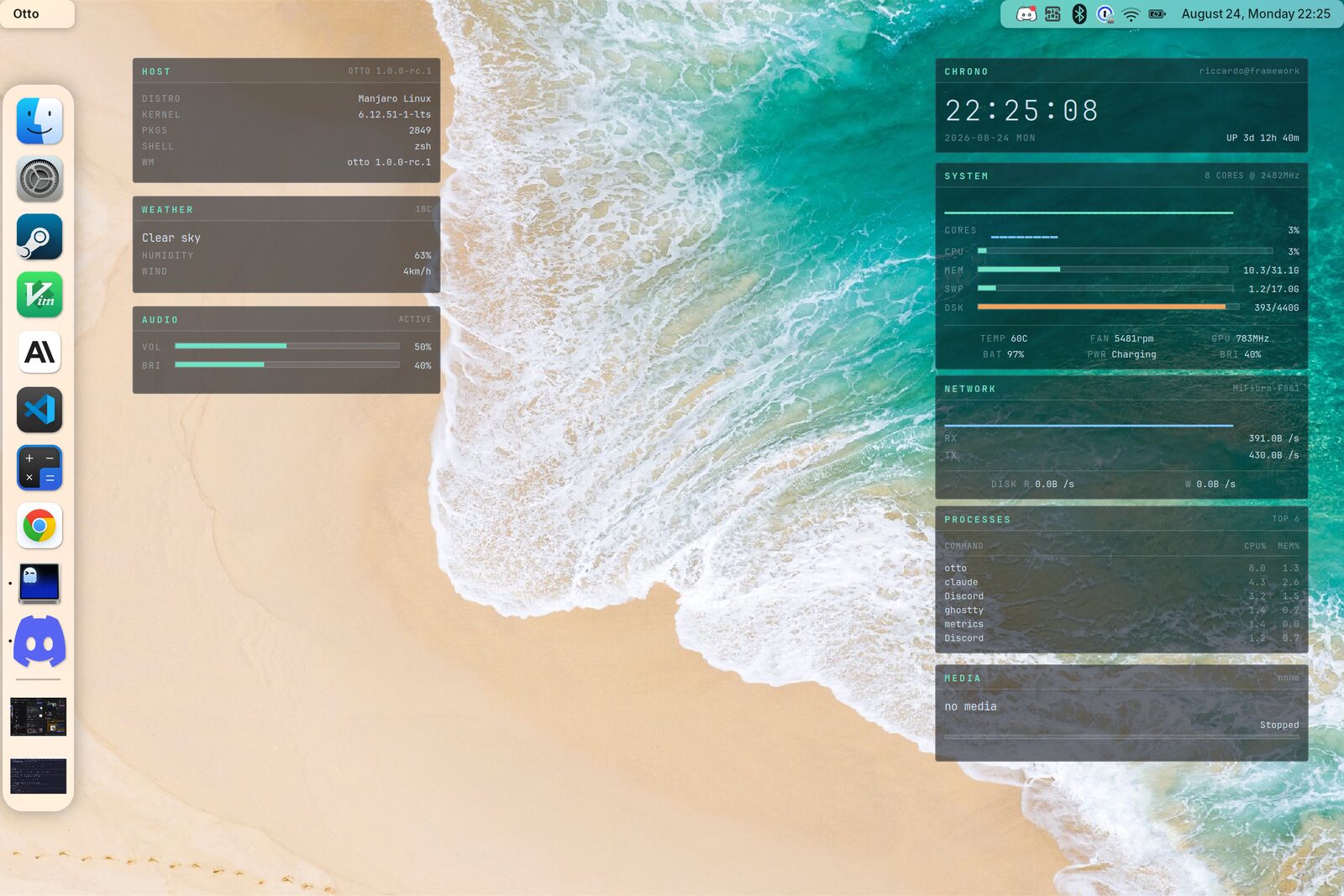
A clock, a CPU sparkline, and live memory, temperature and network readouts. Three files, roughly 100 lines, no dependencies beyond eww itself. The screenshot at the top of this page is an extended version of exactly this: same structure and styling, with more panels hung off the same data source.
One data source, not twenty pollers
The obvious way to feed a dashboard is a defpoll per value. Twenty pollers is
twenty shell pipelines a second. A single script emitting one JSON line per
second, read by a single deflisten, is dramatically cheaper, and every panel
stays consistent because they all read the same sample.
~/.config/eww-hud/scripts/metrics (chmod +x it):
#!/bin/bash
# One JSON line per second: everything the HUD needs, from one process.
BLOCKS=(▁ ▂ ▃ ▄ ▅ ▆ ▇ █)
HIST=(); HIST_N=44
NET_IF=$(ip route show default | awk '{print $5; exit}')
PREV_TOTAL=0; PREV_BUSY=0; PREV_RX=0

blk() { echo -n "${BLOCKS[$(( $1 * 8 / 101 ))]}"; }

while :; do
  # CPU: busy fraction since the previous sample
  read -r _ u n s idle iow irq sirq st _ < /proc/stat
  total=$((u+n+s+idle+iow+irq+sirq+st)); busy=$((total-idle-iow))
  dt=$((total-PREV_TOTAL)); db=$((busy-PREV_BUSY))
  cpu=0; (( dt > 0 )) && cpu=$(( 100*db/dt ))
  PREV_TOTAL=$total; PREV_BUSY=$busy

  HIST+=("$cpu"); (( ${#HIST[@]} > HIST_N )) && HIST=("${HIST[@]:1}")
  spark=""; for v in "${HIST[@]}"; do spark+=$(blk "$v"); done

  while read -r k v _; do
    case $k in MemTotal:) mt=$v ;; MemAvailable:) ma=$v ;; esac
  done < /proc/meminfo
  mem=$(( (mt-ma)*100/mt ))
  memtxt=$(awk -v u=$((mt-ma)) -v t=$mt 'BEGIN{printf "%.1f/%.1fG", u/1048576, t/1048576}')

  temp=$(awk '{printf "%d", $1/1000}' /sys/class/thermal/thermal_zone0/temp)

  rx=$(< /sys/class/net/$NET_IF/statistics/rx_bytes)
  rxr=$(awk -v b=$((rx-PREV_RX)) 'BEGIN{
    if (b<0) b=0
    if (b>1048576) printf "%.1fMB", b/1048576; else printf "%.1fKB", b/1024}')
  PREV_RX=$rx

  printf '{"time":"%s","cpu":%d,"spark":"%s","mem":%d,"memtxt":"%s","temp":%d,"rx":"%s"}\n' \
    "$(date +%H:%M:%S)" "$cpu" "$spark" "$mem" "$memtxt" "$temp" "$rxr"
  sleep 1
done
The block characters (▁▂▃▄▅▆▇█) are the whole trick behind the sparkline:
bucket a percentage into eight and print the matching glyph. No drawing code,
and it costs nothing to redraw.
The widgets
~/.config/eww-hud/eww.yuck:
;; One process feeds every widget, sampled once a second.
(deflisten M :initial `{"time":"--:--:--","cpu":0,"spark":"","mem":0,"memtxt":"","temp":0,"rx":""}`
  "scripts/metrics")

(defwidget panel [title]
  (box :class "panel" :orientation "v" :space-evenly false
    (box :class "panel-head"
      (label :show-truncated false :class "panel-title" :halign "start" :text title))
    (box :class "panel-body" :orientation "v" :space-evenly false
      (children))))

(defwidget row [k v]
  (box :orientation "h" :space-evenly false :spacing 8
    (label :show-truncated false :class "k" :text k)
    (box :hexpand true)
    (label :show-truncated false :class "v" :text v)))

(defwidget w_clock []
  (panel :title "CHRONO"
    (label :show-truncated false :class "clock" :halign "start" :text {M.time})))

(defwidget w_system []
  (panel :title "SYSTEM"
    (box :orientation "v" :space-evenly false :spacing 6
      (label :show-truncated false :class "graph" :halign "start" :text {M.spark})
      (box :class {M.cpu > 85 ? "gauge warn" : "gauge"} :valign "center"
        (scale :value {M.cpu} :min 0 :max 101 :active false))
      (row :k "CPU"  :v "${M.cpu}%")
      (row :k "MEM"  :v {M.memtxt})
      (row :k "TEMP" :v "${M.temp}C")
      (row :k "NET"  :v "${M.rx}/s"))))

;; Bottom layer, no exclusive zone, never takes focus.
(defwindow hud_clock
  :monitor 0 :stacking "bottom" :focusable false :exclusive false
  :geometry (geometry :anchor "top left" :x "1050px" :y "70px"
                      :width "320px" :height "78px")
  (w_clock))

(defwindow hud_system
  :monitor 0 :stacking "bottom" :focusable false :exclusive false
  :geometry (geometry :anchor "top left" :x "1050px" :y "162px"
                      :width "320px" :height "196px")
  (w_system))
defwidget takes parameters and (children), so panel is a reusable frame.
Add a third panel by writing four more lines, not by copying the styling.
The stylesheet
~/.config/eww-hud/eww.scss. Note the warning in the first line; it is the
single most confusing failure mode in eww, and it is explained under
Troubleshooting below.
/* ASCII only: a single non-ascii byte makes grass emit @charset,
   which GTK rejects, and the whole stylesheet is dropped. */
$ink:    #d3e2f2;
$dim:    rgba(211, 226, 242, 0.45);
$faint:  rgba(211, 226, 242, 0.16);
$accent: #6fe3c4;
$warn:   #f2a35e;

* {
  all: unset;
  font-family: "JetBrainsMono Nerd Font", monospace;
  font-size: 11px;
  color: $ink;
}

window { background-color: transparent; }

.panel {
  background-color: rgba(9, 13, 20, 0.58);
  border: 1px solid $faint;
  border-radius: 3px;
}
.panel-head {
  padding: 6px 9px 5px 9px;
  border-bottom: 1px solid $faint;
}
.panel-title { color: $accent; font-size: 10px; font-weight: bold; letter-spacing: 2px; }
.panel-body  { padding: 9px; }

.clock { font-size: 30px; font-weight: 200; letter-spacing: 3px; }
.graph { color: $accent; font-size: 14px; letter-spacing: -1px; }
.k { color: $dim; letter-spacing: 1px; }

.gauge scale trough {
  background-color: rgba(211, 226, 242, 0.10);
  border: 1px solid $faint;
  border-radius: 0;
  min-height: 5px;
  min-width: 80px;
}
.gauge scale trough highlight { background-color: $accent; border-radius: 0; min-height: 5px; }
.gauge scale slider { background-color: transparent; min-height: 0; min-width: 0; margin: 0; }
.gauge.warn scale trough highlight { background-color: $warn; }
Two rules are both required for transparency: GTK paints an opaque window
background from the active theme unless window clears it, and the panel then
supplies its own translucent fill. Otto composites the result over the
wallpaper, so the alpha you choose is what you get. Around 0.5–0.6 stays
readable over a busy wallpaper while still reading as glass.
Running it
chmod +x ~/.config/eww-hud/scripts/metrics
eww --config ~/.config/eww-hud daemon
eww --config ~/.config/eww-hud open-many hud_clock hud_system
The :x values above assume a 1440-logical-pixel-wide screen. If your panels
land off-screen or in the wrong place, that is the scaling section above, not a
bug.
Autostarting widgets
Add them to your Otto config so they come back with the session:
# ~/.config/otto/config.toml

[[exec_once]]
cmd = "eww"
args = ["--config", "/home/you/.config/eww-hud", "daemon"]

[[exec_once]]
cmd = "eww"
args = ["--config", "/home/you/.config/eww-hud", "open-many", "hud_clock", "hud_system"]
args are passed straight to exec with no shell in between, so ~ is not
expanded — write the path out in full. See Autostart for the
ordering rules and the XDG alternative.
Troubleshooting
The stylesheet is ignored entirely
Symptoms: default theme colors, sans-serif font, opaque backgrounds, visible
slider knobs, as if eww.scss did not exist.
eww compiles SCSS with grass, which prepends @charset "UTF-8"; as soon as
the file contains a single non-ASCII byte. GTK’s CSS parser rejects @charset
and discards the whole sheet. An em dash or a degree sign in a comment is enough
to do it. Keep eww.scss strictly ASCII and put Unicode in eww.yuck or in
script output instead:
LC_ALL=C grep -nP '[^\x00-\x7F]' ~/.config/eww-hud/eww.scss
Labels are cut short with an ellipsis
CHRON… instead of CHRONO. eww ellipsizes labels by default; pass
:show-truncated false on the label.
Config errors do not appear in the log
~/.cache/eww/eww_*.log does not capture SCSS and parse errors; those go to
the daemon’s stderr, which is discarded when it forks into the background. Run
it in the foreground to see them:
eww --config ~/.config/eww-hud daemon --no-daemonize 2>&1 | tee /tmp/eww.log
The widget does not appear at all
Check whether it actually opened, and on which output:
eww --config ~/.config/eww-hud active-windows
:monitor indexes the outputs in the order Otto advertises them, which need not
match the order they appear in your config. On a multi-monitor setup a widget
placed on the wrong output is easy to mistake for one that failed to open. See
Display.
The widget hides behind the wallpaper
The wallpaper daemon is on background and the widget should be on bottom;
check :stacking. Two clients on the same layer stack in the order they
connected.
Maximized windows leave a gap
Something has an exclusive zone; set :exclusive false.